


Files
Advanced Windows file manager offers tabbed browsing, dual-pane drag-and-drop, column navigation, built-in archive creation and extraction, file tagging, QuickLook previews, context menu integration, quick search, and customizable appearance for streamlined organization.
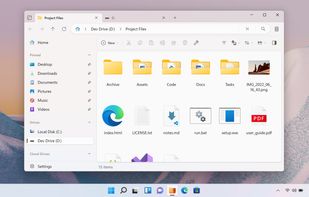

Cost / License
- Free
- Open Source (MIT)
Application typeApplication types
Platforms
- Windows


Features


Files News & Activities
Recent News
- Fla published news article about Files
 Files v4.2.7 improves context menu speed and adds new tab feature
Files v4.2.7 now offers significantly faster and more responsive context menus. Users can also open...
- POX published news article about Files
 Files 4.2 released with tree view sidebar, enhancements when using multiple panes and more
Files 4.2 has been released as the latest version of this open-source file explorer for Windows use...
- Fla published news article about Files
 Files v4.1.4 preview adds tree view sidebar and font thumbnails
Files v4.1.4 preview introduces a tree view in the sidebar, allowing users to navigate folders in a...


Recent activities
- catmuf liked Files
- magicscraper liked Files
 Iakov-Senatov added Files as alternative to mimiNavigator
 Maik-Hofmann added Files as alternative to Peach Commander
 JoakimO added Files as alternative to Cadri Commander
- meowmiau liked Files
cool interface but is REALLY slow, not worth it, i don't know why someone would choose this over the normal windows explorer because even that is better
- nahuelmanutd does not think Lightweight is a important feature of Files
- mag1304 liked Files
- virtualvillainsleague liked Files


Featured in Lists

This is the apps for Windows 11 that I would recommend to anyone who just got a PC ! The same list...

An alternative setup for Windows 11 focusing on open source and privacy-friendly alternatives. Also worth your while:...

A list with 81 apps by ballju without a description.

What is Files?
Files Videos
Files information
Developed by
Files CommunityLicensing
Open Source (MIT) and Free product.Written in
Rating
Average rating of 3.4Alternatives
133 alternatives listedNews
21 news article related to FilesBadge
Get an embeddable badge for FilesSupported Languages

AlternativeTo Categories
File Management, OS & Utilities, System & Hardware, Development, Backup & SyncGitHub repository
- 45,515 Stars
- 2,916 Forks
- 457 Open Issues
- Updated


Comments and Reviews
The program initially makes a really great visual impression. The UI looks clean and well thought out. In my experience, however, the user experience/UX is not yet really ready for use. Overall, “Files” reacts too slowly to work smoothly. You get the feeling that UX development is lagging far behind UI development. BUT: It is a very promising open source project and I see a lot of great potential here. I will definitely take another look in a few weeks to a few months! :)
The same framework that powers the UI (WinAppSdk) is unfortunately a key factor in current performance issues. We hope that future framework updates, along with ongoing optimizations on our end will help mitigate these challenges.
Full of visual bugs, right click panel is a pure chaotic. Theres a good concept somewehere behind the mess, but needs a few more years to develope.
Are you still seeing issues with the right click menu? We did a lot of work improving this feature.
cool interface but is REALLY slow, not worth it, i don't know why someone would choose this over the normal windows explorer because even that is better
It runs terribly, scrolling has tearing, opening menus, switching tabs and pretty much anything comes with a considerable delay or "hitch". It feels like it's running at 30 fps.
Whole Windows Store exclusive thing is awful, nobody should use that place for anything. Don't even have that app installed, and had to jump through their hoops.
Non-optional "diagnostics", meaning thing has to be firewalled as well.
Pretty much the worst file manager around. But it is one of the prettiest for screenshots. But for actual usability, any other is better than this.
You can install Files from outside the Store. Different options are listed on the docs page https://files.community/docs/getting-started/install.
File's new folder size option IS a good thing, but I think I'm more likely to use XYPlorer's file list comparison. "If you are looking for an automated file list comparison with a visual status/difference indicator (such as color codes or unique symbols showing matching, missing, or altered files), you cannot do this natively inside the Files App. "
I like Files' UI very much, and it's a breath of fresh air compared to Windows File Explorer. My initial interest was the tabbed interface. The ability to connect with other cloud storage is awesome. Unfortunately, I didn't stick with it because there was not really any performance gain and I did face the occasional freezing.
Also, I did find it odd that the download page has a prominent link to the Microsoft Store, so the EXE link becomes a little subtle. I'd rather spend a bit of time to build up my opinion on FOSS and, if I decide to keep it, then I'd be happy to support development be it through donations or the paid link.
Its sleek design is ruined the horrible performance. The fact that I have to wait every time I launch it as I see it manually loading my dozen or so tabs one by one is absurd. And you can't blame that on "Calculate folder sizes" because lazy loading a thing!
PS: For those who can't find the free download link, here it is:
https://files.community/appinstallers/Files.stable.appinstaller
There has been a real improvement since May. My Files now rarely crashes when playing videos. And I’m using it more and more as my main file manager.