Freeshot – The free, modern screenshot tool for Windows.
Freeshot is a lightweight, fast and completely free screenshot application for Windows 10 and Windows 11. Built from the ground up to be faster and cleaner than the built-in Windows Snipping Tool or bloated alternatives like ShareX,
Freeshot gives you everything you need in one elegant package – without ads, without registration, and without slowing down your PC.
Capture in a flash
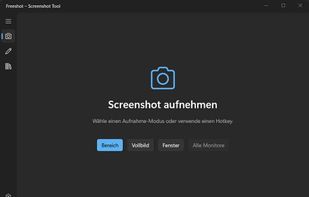
Take screenshots in under 100 ms with global hotkeys. Capture a selected region, a single window, the full screen, or even scrolling content – all with pixel-perfect precision.
Powerful built-in editor
Instantly annotate your shots: add arrows, rectangles, circles, text, highlights, blur sensitive information, crop, and undo with ease. The modern, distraction-free editor feels natural and stays out of your way.
Smart Library
All your screenshots are automatically saved and organized in a clean, searchable library. Browse by date, search by filename or content, group them into folders, and never lose a capture again.
Intelligent printing
Print directly from Freeshot with smart preview: scale multiple images per page, add headers, choose layouts – perfect for documentation, reports or quick handouts.
Why users love Freeshot
• 100 % free forever – no ads, no subscriptions, no telemetry
• Extremely lightweight (under 10 MB installed) and very low CPU/RAM usage
• Privacy-first: everything stays on your computer
• Regular updates with new features based on real user feedback
• Beautiful modern UI that feels right at home on Windows 11
Whether you’re a student, developer, designer, teacher or power user – if you take screenshots every day, Freeshot makes your life simpler, faster and more organized.
Download the latest version for free at freeshot.ch – no account needed, no strings attached.







 POX added Freeshot as alternative to OpenScreenShot
 fakecam added Freeshot as alternative to FastCapture
 ch996811 added Freeshot as alternative to Snip2Field





 freeshot.ch

