
G
G

GrepCut Studio

GrepCut is a video editor designed for users who are frustrated with paywalls at the export button. It operates in any modern browser and as a native Windows app, without adding a watermark on your video. The free plan allows unlimited exports up to 4K at 60 FPS.
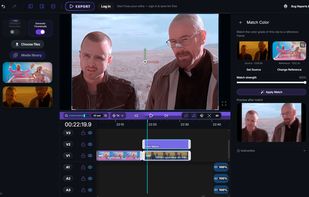
Color Match feature

Cost / License

  • Freemium (Subscription)
  • Proprietary

Application type

Platforms

  • Windows
  • Online
  • Software as a Service (SaaS)
2likes
0articles

Features

Properties

  1.  Lightweight
  2.  Privacy focused
  3.  AI-Powered

Features

  1.  Dark Mode
  2.  Support for 4K
  3.  No registration required
  4.  Chroma Key / Green Screen
  5.  Batch Editing
  6.  Ad-free
  7.  Keyframe Animation
  8.  Live Preview
  9.  Transitions Effects
  10.  Hardware Accelerated
  11.  Works Offline
  12.  Colour Grading
  13.  Non Destructive Editing
  14.  Support for Layers
  15.  No Watermark

GrepCut Studio News & Activities

Highlights All activities

Recent activities

GrepCut Studio information

  • Developed by

    PL flagGrepCut
  • Licensing

    Proprietary and Freemium product.
  • Pricing

    Subscription that costs $19 per month + free version with limited functionality.
  • Alternatives

    51 alternatives listed
  • Badge

    Get an embeddable badge for GrepCut Studio
  • Supported Languages

    • English
GrepCut Studio was added to AlternativeTo by Adam Ziólko on and this page was last updated .
No comments or reviews, maybe you want to be first?

Official Links

What is GrepCut Studio?

GrepCut is a video editor designed for users who are frustrated with paywalls at the export button. It operates in any modern browser and as a native Windows app, without adding a watermark on your video. The free plan allows unlimited exports up to 4K at 60 FPS.

EDITING

  • It offers a multi-track timeline for video, audio, images, GIFs, stickers, shapes, emoji, and text.
  • Features include transitions, chroma key (green screen), blur, vignette, crop, masking, and speed ramps.
  • It provides colour grading with curves, HSL and .cube LUTs, and an automatic colour match between shots.
  • The relight feature allows you to change the lighting of a scene post filming.

AI TOOLS

  • It includes object tracking that follows a subject frame by frame and applies a mask automatically.
  • It offers transcription with animated caption styles that you can preview live before applying.
  • Semantic search allows you to index your footage once, then find any shot by describing it.

MEDIA AND PUBLISHING

  • It includes built-in Pexels stock video and photo library, KLIPY GIF library, sound effects, and Google Fonts.
  • It allows direct import from YouTube.
  • Projects can be stored on your computer or in your Google Drive.

The subscriptions cover AI usage and transcription hours, which cost real money to run. Paid plans also allow you to run the AI features on your own API key. However, the editor and every export remain free.

GrepCut Studio Videos

