highlight-pointer AlternativesCursor Highligters and other similar apps like highlight-pointer

highlight-pointer is described as 'Highlight mouse pointer/cursor using a dot - useful for presentations, screen sharing,' and is a cursor highligter in the os & utilities category. There are more than 10 alternatives to highlight-pointer for Windows, Mac, Linux, GNOME and Homebrew. The best highlight-pointer alternative is CapyCursor, which is free. Other great apps like highlight-pointer are SHARA, ClickLight, Key'n'Stroke and ZoomShot.

Copy a direct link to this comment to your clipboard
highlight-pointer alternatives page was last updated

Alternatives list

  1. CapyCursor icon
     6 likes

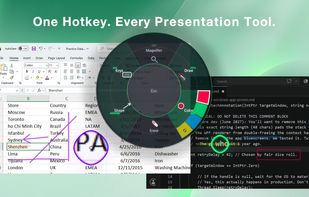
    Lightweight application offering real-time screen annotation, drawing, highlighting, spotlight, and zoom features with customizable tools, hotkey support, and easy cleanup. Ideal for teaching, business presentations, tutorials, and live demonstrations.

    53 CapyCursor alternatives

    Cost / License

    • Free
    • Proprietary

    Alerts

    • Discontinued

    Platforms

    • Windows
     
  2. SHARA icon
     4 likes

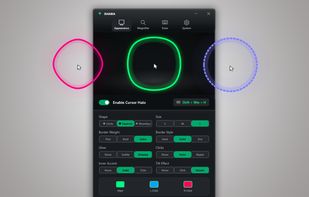
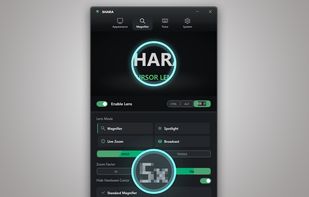
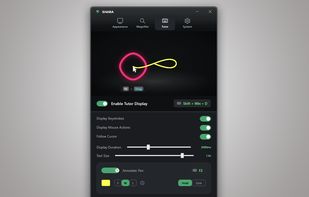
    Provides mouse pointer highlighting with animated glow and 3D tilt, lag-free click-through magnification with customizable zoom modes, and a sleek keystroke visualization overlay. Fully local, privacy-first utility for presentations, coding, streaming, and more on Windows.

    Cost / License

    • Paid
    • Proprietary

    Platforms

    • Windows
     
  3. ClickLight is a macOS menu bar app that highlights clicks during live demos, screen sharing, UX reviews, and other instances where viewers need to track your actions. Unlike screen recorders that add click effects post-recording, ClickLight allows viewers to see when you clicked...

    Cost / License

    • Free
    • Open Source (MIT)

    Platforms

    • Mac
    • Homebrew
     
  4. Key'n'Stroke  icon
     15 likes

    Displays keystrokes, mouse clicks, cursor position, shortcuts, and special keys in a fully customizable overlay. Offers click-through mode, opacity, resizable window, history of pressed keys, high-dpi and multi-dpi screen support, and notification area icon.

    15 Key'n'Stroke alternatives

    Cost / License

    Alerts

    • Discontinued

    Platforms

    • Windows
     
  5. ZoomShot icon
     Like

    A live screen effect layer for macOS that adds real-time zoom, cursor spotlight/highlight, and freehand drawing directly on your screen.

    Cost / License

    • Freemium
    • Proprietary

    Platforms

    • Mac
     
  6. Highlights the pointer with a moving ring, animates mouse clicks for emphasis, dims surroundings to focus attention, and enables real-time screen drawing—ideal for teaching, video tutorials, presentations, or demonstrations requiring clear visual cues and explanations.

    Cost / License

    • Freemium
    • Proprietary

    Application type

    Platforms

    • Mac
     
  7. Displays pointer location, click events, wheel rotation, and keypresses using halos, crosshair, animated rings, and keyboard indicators. All elements are highly adjustable in size, color, shape, and transparency, supporting clear on-screen demonstrations and tutorials.

    Cost / License

    • Freemium
    • Proprietary

    Alerts

    • Discontinued

    Platforms

    • Windows
     
  8. Kokomite icon
     1 like

    Kokomite is a software that draws semi-transparent circles (or rings) around the mouse cursor to make the focus easier to understand in a presentation.

    Cost / License

    • Free
    • Proprietary

    Application type

    Platforms

    • Windows
     
  9. Demo your keyboard shortcuts, easy as pie.

    Cost / License

    • Freemium
    • Proprietary

    Application type

    Platforms

    • Mac
     
  10. PenAttention icon
     4 likes

    Displays a visible highlight, pencil, or pointer at the pen's location on Windows devices, enhancing audience visibility during presentations and screen sharing, with customizable styles, low resource usage, real-time on/off toggling, and compatibility for teachers and presenters.

    Cost / License

    • Free
    • Proprietary (MIT)

    Application type

    Platforms

    • Windows
     
  11. The highlight feature creates a spotlight-effect on your screen, so you can point, click, and rest assured that your audience is following along.

    Cost / License

    • Free
    • Proprietary

    Application type

    Platforms

    • Windows
     
  12. Jiggle icon
     1 like

    Jiggle is a Gnome Shell extension that highlights the cursor position when the mouse is moved rapidly.

    Cost / License

    Platforms

    • Linux
    • GNOME
     
12 of 15 highlight-pointer alternatives