



Image Toolbox
Versatile image editing app with cropping, filters, quality and format options, EXIF metadata editing, PDF conversion, background removal, batch processing and color picking, all in an open-source package for Android with a clean interface and no in-app ads.
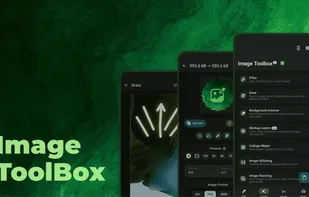

Features
Properties
- Lightweight
- Privacy focused
Features
- Image resizing
- Image Conversion
- Crop images
- Image Optimizer
- Works Offline
- Ad-free
- Remove EXIF Data
- Image Comparison
- Photographic filters
- No registration required
- Batch processing
- Image Preview
- Batch conversion
- Remove Image Background
- Dark Mode
- No Tracking
- Color Picker
- Cipher
- Batch Editing
- Blur Filter
- Custom Brushes
- Built-in Color Picker
- OCR
- Support for Layers
- Free hand drawing
Tags
- exif
- exiftool
- F-droid
- image-manipulation
- Android
- EXIF Metadata
- resizer-image
- crop-image
- jetpack-compose
- bitmap
- kotlin
- offline-ocr
- clean-architecture
- fdroid
- Material You
- filter-image
Image Toolbox News & Activities
Recent News
Recent activities
- Shojimeguro reviewed Image Toolbox
will be great if there is desktop version too
- kelsonv reviewed Image Toolbox
The swiss army knife of image editors. You can do almost anything if you can find the feature. One of the few mobile image apps I've found that will preserve location metadata while editing (if you want it to), which makes it helpful for things like adjusting the contrast before uploading an observation to iNaturalist
The only real problem I've run into is that it shrinks images to the screen size when you crop them, which means losing detail unless youre...
- Maoholguin updated Image Toolbox
 Krissscool added Image Toolbox as alternative to SnapScaler
- kelsonv reviewed Image Toolbox
The swiss army knife of image editors. You can do almost anything if you can find the feature. One of the few mobile image apps I've found that will preserve location metadata while editing (if you want it to), which makes it helpful for things like adjusting the contrast before uploading an observation to iNaturalist
The only real problem I've run into is that it shrinks images to the screen size when you crop them, which means losing detail unless youre...
 OrdinaryPerson added Image Toolbox as alternative to DeJPEG
 saay added Image Toolbox as alternative to Batcher
- Navi reviewed Image Toolbox
I used the 64bit architecture specific FOSS version. Image Toolbox has some more advanced features and good level of customization to the theming but terrible UI/UX. Want to just make a quick simple manual edit? You can't do that easily. Saturation, hue, contrast and so on are all only able to be edited individually and in different filter locations. The good thing is the filters are none destructive so you can delete a filter in a stack of filters. Unfortunately don't really get a live preview...
Featured in Lists
UI = User Interface UX = User eXperience Most open source apps offer out-dated or classic material design UI. If the …
Everytime I setup a phone for a friend or myself I usually remove stock apps using adb or …
A list of apps I use on GrapheneOS, but most also make sense on other operating systems. Install "F-Droid …
What is Image Toolbox?
ImageToolbox is a versatile image editing tool designed for efficient photo manipulation. It allows users to crop, apply filters, edit EXIF data, erase backgrounds, and even convert images to PDFs. Ideal for both photographers and developers, the tool offers a simple interface with powerful capabilities.
Image Toolbox Videos

Image Toolbox information
Developed by
 Malik Mukhametzyanov
 Licensing
Open Source (Apache-2.0) and Free product.Rating
Average rating of 4.4Alternatives
77 alternatives listedSupported Languages
- English
- Russian
- Serbian
- Ukrainian
- Afrikaans
- Danish
- German
- Spanish
- Basque
- Czech
- Tagalog
- French
- Indonesian
- Italian
- Polish
- Portuguese
- Romanian
- Slovene
- Vietnamese
- Turkish
- Hebrew
- Arabic
- Hindi
- Bengali
- Thai
- Korean
- Japanese
- Chinese
- Tamil
AlternativeTo Categories
Photos & Graphics, Office & ProductivityGitHub repository
- 11,361 Stars
- 493 Forks
- 0 Open Issues
- Updated


Comments and Reviews
The swiss army knife of image editors. You can do almost anything if you can find the feature. One of the few mobile image apps I've found that will preserve location metadata while editing (if you want it to), which makes it helpful for things like adjusting the contrast before uploading an observation to iNaturalist
The only real problem I've run into is that it shrinks images to the screen size when you crop them, which means losing detail unless youre cropping it to a small enough area that all the pixels fit on your display. I've worked around this by cropping in Fossify Gallery and adjusting colors in Image Toolbox.
will be great if there is desktop version too
Absolutely best app and most features per app. You can do everything with the photos you ever wanted and things you didn't know you could do, and you can customize everything in the appearance of the app, too! If I had infinite time at my hands and would want to create a perfect picture editing app, I would try to create an app like this.
Tbh I mostly use it to resize images and blur sensitive information
Use this app often, because it just has all the tools I need. Haven't encountered any problems, but im not an expert in image editing.
I used the 64bit architecture specific FOSS version. Image Toolbox has some more advanced features and good level of customization to the theming but terrible UI/UX. Want to just make a quick simple manual edit? You can't do that easily. Saturation, hue, contrast and so on are all only able to be edited individually and in different filter locations. The good thing is the filters are none destructive so you can delete a filter in a stack of filters. Unfortunately don't really get a live preview because the image tries to render itself before displaying so you have to work a bit blindly and if you want to apply multiple edits this becomes a very tedious task. Image file conversion speed will depend on settings and your device CPU power and file format. Some of the image format conversions are buggy such as JXL causing an app crash when rendering at higher compression setting. Not recommended for making quick manual color and light edits from how time consuming it is but good for ready filters and more detailed work and niche features if you don't mind taking time to get around the poor means to accomplish this. I may try the market version later to see if it is better performance or not. Unfortunately open source image editors for Android are slim pickings especially one's still maintained.
Offline OCR
Good image manipulation toolbox, riddled by questionable UI choices.