




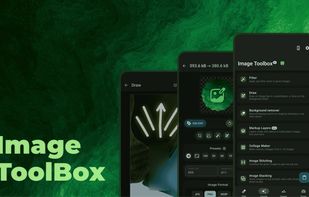
Image Toolbox
Supports cropping, filter use, EXIF editing, and background removal with AI, PDF conversion and editing, batch processing, OCR, encryption, custom filters, barcode scanning, SVG tracing, color selection, histogram, collage, and diverse format export.

Cost / License
- Free
- Open Source (Apache-2.0)
Application typeApplication types
Platforms
- Android
- F-Droid
- OpenAPK


Features
Image Toolbox News & Activities
Recent News
Recent activities
- c17s5qhu updated Image Toolbox
- cangrejito liked Image Toolbox
- DomIsDazed added Image Toolbox as alternative to MA Photos
- meowmiau liked Image Toolbox
- El_Dios_de_las_Ideas liked Image Toolbox
Got hold of the app through F-Droid. There's plenty of features to edit your photos, but not easy to find. I've paired this up with the Aves Libre gallery app.
- shazmataz liked Image Toolbox
 Maoholguin added Image Toolbox as alternative to QRix
- brickelt963-altto added Batch Rename Files as a feature to Image Toolbox
A really good ‘all-in-one’ tool for quickly editing images, PDFs, GIFs and so on. Since the recent update (108 FOSS), I’ve noticed a significant improvement in how smoothly it runs and a better organisation of the tools. One of the few Android tools that allows conversion to or from JPEG XL (.jxl).


Featured in Lists

UI = User Interface UX = User eXperience Most open source apps offer out-dated or classic material design UI. If the...

Everytime I setup a phone for a friend or myself I usually remove stock apps using adb or...
A list of apps I use on GrapheneOS, but most also make sense on other operating systems. Install "F-Droid...

What is Image Toolbox?
Image Toolbox Videos
Image Toolbox information
Developed by
 Malik Mukhametzyanov
 Licensing
Open Source (Apache-2.0) and Free product.Rating
Average rating of 4.2Alternatives
83 alternatives listedBadge
Get an embeddable badge for Image ToolboxSupported Languages
AlternativeTo Categories
Photos & Graphics, AI Tools & Services, File Management, Office & ProductivityGitHub repository
- 14,645 Stars
- 632 Forks
- 9 Open Issues
- Updated


Comments and Reviews
The swiss army knife of image editors. You can do almost anything if you can find the feature. One of the few mobile image apps I've found that will preserve location metadata while editing (if you want it to), which makes it helpful for things like adjusting the contrast before uploading an observation to iNaturalist
The only real problem I've run into is that it shrinks images to the screen size when you crop them, which means losing detail unless youre cropping it to a small enough area that all the pixels fit on your display. I've worked around this by cropping in Fossify Gallery and adjusting colors in Image Toolbox.
Got hold of the app through F-Droid. There's plenty of features to edit your photos, but not easy to find. I've paired this up with the Aves Libre gallery app.
A really good ‘all-in-one’ tool for quickly editing images, PDFs, GIFs and so on. Since the recent update (108 FOSS), I’ve noticed a significant improvement in how smoothly it runs and a better organisation of the tools. One of the few Android tools that allows conversion to or from JPEG XL (.jxl).
I wish there will be an desktop version
will be great if there is desktop version too
Absolutely best app and most features per app. You can do everything with the photos you ever wanted and things you didn't know you could do, and you can customize everything in the appearance of the app, too! If I had infinite time at my hands and would want to create a perfect picture editing app, I would try to create an app like this.
Tbh I mostly use it to resize images and blur sensitive information
Use this app often, because it just has all the tools I need. Haven't encountered any problems, but im not an expert in image editing.