




Sly
59 likes
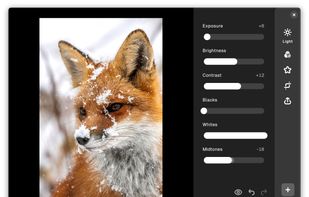
Sly is a user-friendly, offline image editor requiring no expertise; adjust brightness, contrast, apply effects, and export in JPEG or PNG formats with control over metadata.

Cost / License
- Free
- Open Source (GPL-3.0)
Application typeApplication types
Platforms
- Linux
- Online
- Android
- Flathub
- Flatpak
- Linux Mobile


Features
Sly News & Activities
Highlights All activities
Recent News
No news, maybe you know any news worth sharing?
Share a News TipRecent activities


Featured in Lists
UI = User Interface UX = User eXperience Most open source apps offer out-dated or classic material design UI. If the...
List by Darlene Sonalder with 206 apps, updated
A list with 27 apps by rainbowchecker without a description.
List by rainbowchecker with 27 apps, updated
How are you! In this list, I bring you a large number of open source applications for Android that are available in...
List by AxelFOSS with 125 apps, updated

What is Sly?
Sly information
Developed by
kramoLicensing
Open Source (GPL-3.0) and Free product.Rating
Average rating of 4Alternatives
20 alternatives listedBadge
Get an embeddable badge for SlySupported Languages


Comments and Reviews
Great for doing basics like crop, rotate, contrast, etc.
Simple, friendly app for adjusting images without calling out to some cloud service. Good for fixing color balance, cropping, etc.
Unfortunately it seems to drop all EXIF metadata, even when I tell the app to preserve it. 99% of the time I want to keep the timestamps at the very least! And sometimes I want to keep the location data.
Very simple editing capabilities but get the job done. Don't expect more like color accuracy and such
Simple, lightweight, and nicely designed image editor. It can do all the basic stuff (rotate, crop, contrast, luminosity, vignette, etc.), which is enough for 99% of photo editing. It's not as feature-complete as Snapseed, for example, but it's completely free and open source.
I use Sly for quick and dirty image manipulation. It has enough features to do basic stuff like brightness, contrast, saturation, noise reduction, sharpness, rotation and so on. But I miss a feature to change the size of the picture or the canvas.
Sly is interesting, because it tries to do a photo editing app, but it just doesn't understand any basic photo editing principal, so the final result is sub-par with any other photo editor. I am a professional photo editor, and I use darktable for precise color adjustments, and this app is just worst than lightroom in that regard. BUT if you want something simple and basic, it is a great option, just be aware, that it is really limited and the available tools are based on old and outdated photo editing practices...