

PageBunker icon
PageBunker icon

PageBunker

Save articles. Read offline. Search later. Read-it-later extension with automatic local backup for Chrome, Edge and Firefox. No account, no server.
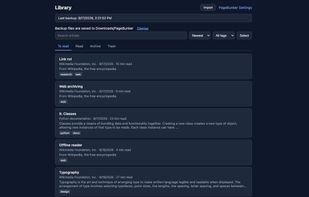
Library with saved articles, backup status, and search

Cost / License

  • Free
  • Open Source (MIT)

Application type

Platforms

  • Google Chrome
  • Microsoft Edge
  • Mozilla Firefox  Firefox listing is in review; the add-on is available from the GitHub releases page until it is published.
0likes
0articles

Features

Properties

  1.  Local-First

Features

  1.  No registration required
  2.  No Tracking
  3.  Offline Reading

PageBunker News & Activities

Highlights All activities

Recent activities

PageBunker information

AlternativeTo Category

News & Books

GitHub repository

  •  0 Stars
  •  0 Forks
  •  0 Open Issues
  •   Updated  
View on GitHub
PageBunker was added to AlternativeTo by elite-kid on and this page was last updated .
No comments or reviews, maybe you want to be first?

What is PageBunker?

PageBunker is a Chrome, Edge, and Firefox extension that saves the article you are reading to your own device. No account, no server.

Saving keeps the title, author, publish date, and the article body (paragraphs, headings, lists, quotes, code, tables) and leaves out ads, menus, and comments. If the body cannot be extracted, the link is saved instead. Saved articles open without a network connection and still open after the original page is gone. Images are not loaded by default, so the original site is not contacted when you read.

The library has To read, Read, Archive, and Trash (Trash empties after 30 days), with sorting, tags, and multi-select. Search covers titles, sites, tags, and the full article text in English and Korean.

Every library change writes a backup file to Downloads/PageBunker/pagebunker-latest.json, plus a dated file at most once a day (latest 7 kept). The browser keeps 3 recent copies. Removing the extension leaves the Downloads files in place, and you can restore from one of them. This is a file on the same machine, not a cloud backup.

You can import a Pocket CSV, Pocket legacy HTML, Instapaper CSV, or a bookmarks HTML file with a preview and an undo; imported rows arrive as links until you open the page and save. Export is one HTML file or one Markdown file per article.

Missing on purpose: no device sync, no mobile app, no highlights, no cloud storage. MIT licensed, no analytics, no host permissions.