PDF Inspector icon
PDF Inspector icon

PDF Inspector

A DevTools-style PDF element inspector and editor for Android.
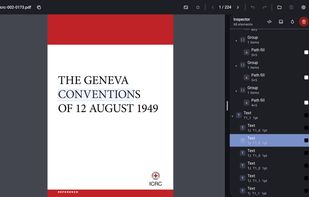
PDF Inspector screenshot 1

Cost / License

  • Free
  • Open Source (MIT)

Platforms

  • Android
  • Android Tablet
0likes
0comments
0articles

Features

Properties

  1.  Privacy focused

Features

  1.  Works Offline
  2.  No registration required
  3.  Dark Mode
  4.  No Tracking
  5.  Non Destructive Editing
  6.  Ad-free

PDF Inspector News & Activities

Highlights All activities

Recent activities

PDF Inspector information

  • Developed by

    shardulvs
  • Licensing

    Open Source (MIT) and Free product.
  • Alternatives

    9 alternatives listed
  • Supported Languages

    • English

AlternativeTo Categories

Office & ProductivityPhotos & Graphics

GitHub repository

  •  5 Stars
  •  0 Forks
  •  0 Open Issues
  •   Updated  
View on GitHub
PDF Inspector was added to AlternativeTo by Paul on and this page was last updated .
No comments or reviews, maybe you want to be first?

What is PDF Inspector?

A DevTools-style element inspector and editor for PDFs on Android.

At a glance:

  • DevTools for PDFs: every page's content stream is parsed into a navigable tree of text blocks, vector paths and images, grouped the way the PDF actually draws them. Switch between friendly labels and the raw content-stream operators.
  • Two-way selection: tap an element on the page or tap its row in the tree, and the other side highlights to match, drawn as a clear bordered outline on the canvas.
  • Edit in place: move and resize any element, recolor its fill or stroke as hex (the editor names the element's color space), and retype text. When the original font is missing a character, re-encode the line with a fallback font, bundled (Liberation) or taken from your device or imported. Changes are written straight back into the content stream, with full undo and redo.
  • Surgical delete: remove exactly the element you picked by rewriting just its slice of the content stream, leaving the rest of the page untouched.
  • Save a copy, never the original: your edited PDF is written to a new file through the system file picker, so the source document is left exactly as it was.
  • Smooth viewing: pan and pinch-zoom, fit to width or height, a global zoom that carries across pages, and a full-screen mode.
  • Dockable inspector: the inspector panel docks to the side in landscape or the bottom in portrait, resizes by dragging, and can be made transparent to see the page through it.
  • Material You: Material 3 design with dynamic color on Android 12+, light / dark / system themes and a choice of accent colors.
  • Private and open: open source, no accounts, no telemetry. No network access and no storage permission: files are opened and saved through Android's Storage Access Framework, so the app only ever touches the documents you explicitly pick.

