PDF Platform icon
PDF Platform icon

PDF Platform

Word, Excel, PowerPoint and images, OCR scanned documents into searchable PDFs, edit existing text, sign, annotate, add watermarks or page numbers, encrypt, unlock, repair and flatten, extract embedded images or plain text, convert a web page to PDF, and scan paper documents...
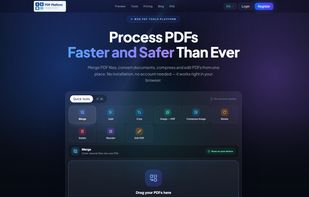
PDF Platform screenshot 1

Cost / License

  • Freemium (Subscription)
  • Proprietary

Application type

Platforms

  • Online
  • Software as a Service (SaaS)
0likes
0articles

Features

Properties

  1.  Privacy focused
  2.  AI-Powered

Features

  1.  PDF compression
  2.  PDF annotation
  3.  No registration required
  4.  Ad-free
  5.  Split PDF files
  6.  Works Offline
  7.  OCR
  8.  Built-in viewer
  9.  Combine PDF
  10.  PDF encryption
  11.  Sign PDF files

PDF Platform News & Activities

Highlights All activities

Recent activities

PDF Platform information

  • Developed by

    TR flagPDF Platform
  • Licensing

    Proprietary and Freemium product.
  • Pricing

    Subscription ranging between $4 and $40 per month + free version with limited functionality.
  • Alternatives

    17 alternatives listed
  • Badge

    Get an embeddable badge for PDF Platform
  • Supported Languages

    • English
    • Turkish
PDF Platform was added to AlternativeTo by Burak KAYA on and this page was last updated .
No comments or reviews, maybe you want to be first?

Official Links

What is PDF Platform?

Word, Excel, PowerPoint and images, OCR scanned documents into searchable PDFs, edit existing text, sign, annotate, add watermarks or page numbers, encrypt, unlock, repair and flatten, extract embedded images or plain text, convert a web page to PDF, and scan paper documents with a phone camera.

Two things set it apart from most online PDF services.

First, page operations run in your browser. Merging, splitting, rotating, cropping, deleting and reordering pages, converting images to PDF, signing and annotating all happen on your own computer. The file is never uploaded, so there is nothing to delete afterwards. You can verify this by disconnecting from the internet — those tools keep working. Tools that genuinely need a server, such as OCR and format conversion, say so on their page, and those files are removed as soon as the job finishes.

Second, no plan adds a watermark to your output. Free users get the same clean file as paying users. The free plan is limited by how many operations you run per day, not by damaging the result.

There is also AI-powered summarization: turn a long PDF into a structured summary with title, key topics and key points, without reading it end to end. More AI tools are in development.

The site installs on phones as a web app and includes a document scanner that uses the phone camera with automatic edge detection and perspective correction.

Paid plans start at $3.99 per month; the higher tier is a team plan with multiple seats. The free plan needs no card and adds no watermark.

Available in English and Turkish.