🔐 Your photos deserve AI that respects your privacy.
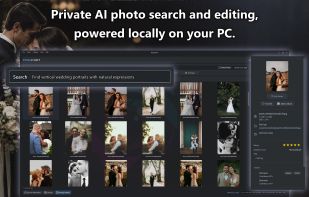
PhotoCHAT is a powerful Windows photo manager with 100% local AI for search, face recognition, photo culling, organization, and editing.
No cloud uploads. No subscriptions. No account. No data mining. Your photos stay on your PC.
🔍 SEARCH PHOTOS WITH NATURAL LANGUAGE
Forget filenames and endless folders. Just describe the photo:
“a black truck parked by a lake at sunset”
“kids opening Christmas presents”
“photos of John and Sam without Matt”
“food on the table taken in April 2023”
PhotoCHAT understands what is in your photos and can search huge local libraries in seconds.
🏆 AI PHOTO CULLING & QUALITY SCORING
Automatically score photos for visual quality and composition so you can quickly find the best shots from bursts, events, weddings, travel, family albums, or massive archives.
Surface the keepers. Skip the junk.
🕵️ FACE RECOGNITION & PEOPLE SEARCH
PhotoCHAT detects and groups faces automatically. Name someone once, then search naturally:
“photos of Mum and Dad together”
“John at the wedding”
“Sarah and Tim at the beach”
AI age and gender detection adds even more ways to filter and explore large collections.
✨ BUILT-IN AI IMAGE STUDIO
Edit and restore photos without uploading them anywhere:
• Generative editing with text prompts
• AI Masking: Automatically isolate people, faces, backgrounds, and facial features for targeted edits
• AI upscaling up to 4x
• Face restoration
• Colorization
• Denoising
• Object removal
• Auto Enhance
• Crop, resize, draw, transform, and adjust
• OCR text extraction
All AI runs locally on your PC.
👁️ SEARCH BY IMAGE
Drop in any photo to find visually similar images, near-duplicates, related scenes, alternate angles, or the original version of an edited photo.
🚀 FAST, LOCAL, HARDWARE-ACCELERATED
Built for serious photo libraries with fast indexing, instant previews, and rapid search across thousands of images.
Supports NVIDIA, AMD, and Intel hardware using CUDA, DirectML, OpenVINO, and CPU fallback.
🛠️ REAL PHOTO MANAGEMENT
• Smart Albums
• Favorites and star ratings
• Tags, filters, and sorting
• Move, rename, copy, or delete files
• Drag-and-drop workflows
• Android USB import
• Network drive and NAS support
PhotoCHAT works with the folders you already have instead of forcing your memories into someone else’s cloud.
💰 ONE PRICE. NO SUBSCRIPTIONS.
Buy PhotoCHAT once and use it on your Windows PC.
No monthly fees. No cloud storage plans. No account lock-in.
PhotoCHAT — Private AI photo search, culling, organization, and editing for Windows.







 pixfinder added PhotoCHAT AI as alternative to PixFinder
 PLASTICITYLab added PhotoCHAT AI as alternative to Immich
 PLASTICITYLab added PhotoCHAT AI as alternative to Picasa

 PLASTICITY Lab


Comments and Reviews
Saw this on a forum and gave it a try. The AI search is actually legit. It found "screenshots of zelda" without me ever tagging them.