




digiKam
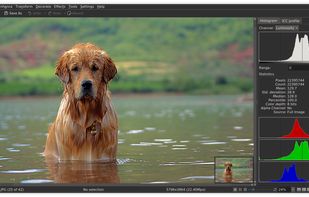
digiKam is an advanced digital photo management tool that simplifies importing and organizing photos into albums. It supports various formats including RAW, features tagging, metadata management, duplicate finder, photo editing, sharing, GPS data handling, and has cross-platform compatibility.

Cost / License
- Free
- Open Source (GPL-2.0)
Application typeApplication types
 EU
EUPlatforms
- Mac
- Windows
- Linux
- BSD
- KDE Plasma
- Flathub
- Qt


Features
digiKam News & Activities
Recent News
- POX published news article about digiKam
 digiKam 9.1 brings support for Pixel motion photos, enhanced advanced search, and more
digiKam 9.1 has been released as the latest version of this free and open-source digital asset mana...
- POX published news article about digiKam
 digiKam 9.0 released as a massive update for photographers using this open source software
digiKam 9.0 arrives as a major release of this free and open source photo management software, feat...
- Maoholguin published news article about digiKam
 digiKam 8.8 adds hierarchical tag import, focus point preview, and new blur tool
digiKam 8.8 introduces workflow improvements with the ability to import and export hierarchical tag...


Recent activities
 serg218 added digiKam as alternative to Nostalgic Photo DataBase
- bulldogs liked digiKam
 morphy added digiKam as alternative to Stash - Asset Manager
 POX added digiKam as alternative to PhotoFlare Lens
 Tarun-Chawla added digiKam as alternative to FotoBrowser


Featured in Lists

This guide is designed for anyone looking to take greater control of their digital life by choosing open-source...

Ever wondering about free great open source software to start your idea? Here's a list for you to get...

A list with 807 apps by AmileyaRyver without a description.
What is digiKam?
digiKam information
Developed by
 KDE
KDE Licensing
Open Source (GPL-2.0) and Free product.Rating
Average rating of 4.4Alternatives
132 alternatives listedNews
10 news article related to digiKamBadge
Get an embeddable badge for digiKamSupported Languages


Comments and Reviews
Pretty good both in usability and interface. It has the same UI features and organisation ways that you can see in other very popular open source software (Blender, Krita, and so on...), many options in making your personal workflow and layout, pretty good performance and some extra sweets for those who is interesting in advance organisation features (face search, similar images and even more). I think you certainly should give this program a chance and make your very own opinion because UI is kinda unusual for a newcomers that never used Open Source software.
okay
There must be some advantages to this app but I simply can't find any in this muddled mass of windows that don't make much sense individually or collectively. Spent a day with it and then jettisoned it from my drive and washed my hands thoroughly. If this was my only alternative to LR, I'd gladly pay my annual fee to Adobe.
Is very interesting
I have been using Digikam as my main photo management software for years on both Linux and Windows. It has proven a reliable tool for the casual enthusiast. Handy features like tag labeling and photo upload integration work well.
Still has ways to go to be in the same league as Adobe and the big guys, but I appreciate that this is a community driven project and more than fulfills my needs.
Capabilities: plenty Support for modern formats: plenty Great metadata handling: absolutely
However. The user-experience has a (too) steep learning curve. Where (for example) XNview is extremely easy to use and has a very nice and customizable user interface, I found Digikam to be very difficult to use. (or even find simple features).
I do appreciate the work though and I may look into it in the future.
1.6gb space to install. From LeoAI: "You cannot move a tag directly on the image itself within digiKam. Tags are metadata associated with the image file and are managed within the software's interface, not overlaid onto the image display."
Wonky UI. Broken facial recognition and duplicate checker. Hardware acceleration does not work on Intel Arc GPUs. Overall waste of time.
I'd say that facial recognition is half-baked. At least it is improving in updates.