
P
P

pictkura

pictkura does two things and stops: it imports from a USB drive or SD card into folders sorted by capture date, and it lays out a large library so you can find and look at what you already have.
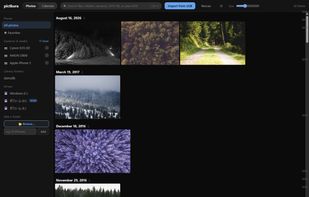
The library, laid out by capture date, with a year scrubber down the right edge.

Cost / License

  • Free
  • Open Source (MIT)

Application type

Platforms

  • Mac  macOS 11 or later, Apple Silicon only — there is no Intel build. Not signed with a Developer ID, so the first launch needs a Gatekeeper step. Video thumbnails are not wired up on macOS yet.
  • Windows  Windows 10/11 (x64). Needs the WebView2 runtime, already present on Windows 11 and up-to-date Windows 10. Installer, machine-wide MSI and a portable ZIP are provided. Not code-signed, so SmartScreen warns on first run.
0likes
0articles

Features

Properties

  1.  Privacy focused
  2.  Lightweight

Features

  1.  Portable
  2.  Dark Mode
  3.  Ad-free
  4.  Works Offline
  5.  Built-in viewer
  6.  No registration required
  7.  No Tracking

pictkura News & Activities

Highlights All activities

Recent activities

pictkura information

AlternativeTo Category

Photos & Graphics

GitHub repository

  •  0 Stars
  •  0 Forks
  •  0 Open Issues
  •   Updated  
View on GitHub
pictkura was added to AlternativeTo by Harusame64 on and this page was last updated .
No comments or reviews, maybe you want to be first?

What is pictkura?

pictkura does two things and stops: it imports from a USB drive or SD card into folders sorted by capture date, and it lays out a large library so you can find and look at what you already have.

It reads the NTFS change journal, so a second launch only visits files that changed since last time. Thumbnails are scaled with SIMD and JPEG is decoded at a reduced scale. Every search is an index seek (SQLite FTS5, with CJK expanded to bigrams). Tiles are sized from width and height held in the database, so nothing jumps around while a screenful loads.

RAW files are not developed — the display JPEG the camera embedded is used as-is, which keeps the camera's own colour and costs no demosaicing. 24 RAW extensions were confirmed against real files, including Apple ProRAW. HEIC, AVIF and video are handled too, and files that exist only in the cloud are never downloaded on their own: the real file is fetched only when you actually look at that photo.

What it deliberately does not do: no RAW development, no editing, no AI culling, no tagging, and one sort order only. Those omissions are listed openly on the site.

Free and MIT licensed, with no account and no telemetry. The only outbound connection is a once-a-day update check that can be turned off entirely.