piDock is a calmer way to organize a cluttered Windows desktop.
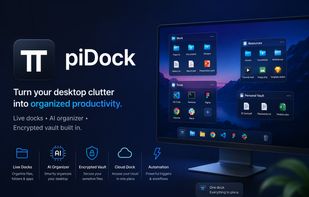
Instead of scattering files, folders, and shortcuts across your desktop, piDock lets you group them into small, movable "docks" — resizable panels you can drag, snap, and align just like windows in a design tool. Each dock type solves a different everyday problem: a Container groups loose files, a Gateway dock gives you a live view into any folder, a Drive dock watches a disk's free space and recent activity, and an Action dock turns a single click into an email, a saved command, an HTTP call, or an MQTT message.
The standout feature is the built-in AI Organizer: one click sorts a messy desktop into sensible categories using a local, offline model — nothing is uploaded to the cloud, so it works without an internet connection and keeps your files private.
piDock is built to stay out of your way. It runs on roughly 75MB of RAM, installs in under a minute with no administrator rights, and checks for updates in the background so you're never stuck on an old version.
For anything sensitive, the Encrypted Vault dock protects files with AES-256 encryption behind a password. A read-only FTP dock and a Git dock (with live repo status) round things out for users who work with remote files and code.
piDock is free to try in full for 7 days — no crippled "lite" version, no account required. After that, a single one-time license unlocks it permanently on one device, including all future dock types, with no subscription.
- Key Features
AI Organizer — one-click desktop cleanup using a local, offline AI model
Container & Gateway docks — group files or get a live view into any folder
Drive docks — monitor a drive's free space, recent activity, and most-used files
Action dock — one-click triggers: send an email, run a command, call an API, publish MQTT
Pinboard — a sticky-note dock for text, file links, and web links
FTP & Git docks — read-only FTP explorer with encrypted credentials, plus live Git repo status
Encrypted Vault — AES-256 password-protected dock for sensitive files
Smart alignment guides — docks snap and align to each other while dragging/resizing
Super lightweight — ~75MB RAM, no background bloat
Automatic updates — background update checks, one-click install
10 languages — English, Spanish, Italian, Polish, Korean, Turkish, Czech, Greek, Russian, Chinese
No admin rights needed — installs per-user in seconds








 pidock added piDock as alternative to Portals: Desktop Organization, Tokri, Desktop Frames + and Floxtop
 Logiciel NaNXOR
