




Portals: Desktop Organization
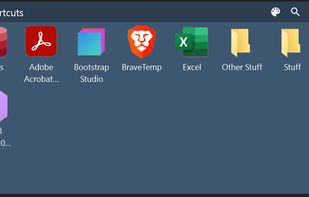
Create containers (aka Portals) on your desktop which show the contents of a specified folder. Divide your desktop into folders then use Portals to display the contents of the folders in an organized fashion - you can even hide the folders away somewhere else.

Cost / License
- Free
- Proprietary
Application type
Platforms
- Windows


Features
Portals: Desktop Organization News & Activities
Recent News
Recent activities
- pino76 A comment was removed from Portals: Desktop Organization
- Kitanya liked Portals: Desktop Organization
 H-Tung added Portals: Desktop Organization as alternative to DeskBox
 pidock added Portals: Desktop Organization as alternative to piDock
 deskripple added Portals: Desktop Organization as alternative to DeskRipple
 the_Libre_one added Portals: Desktop Organization as alternative to Deskepty
I love Portals: Desktop Organization because it’s easy to use and it can be able to organize your too many icons desktop with no hassle. But you needed to save your layout before you leave it. If not, you needed to set up your desktop ever again. (I have to move all my desktop icon to a newly created folder called “Desktop container” and then organize all of them to specific folder like Programs or games or categorized them into each program categories.)
- kp-jayupperpie liked Portals: Desktop Organization
 MetalPhoenix added Portals: Desktop Organization as alternative to Shortcutty


Featured in Lists

my software list, mostly open-source.I have used the vast majority of the software listed there myself for a long...
What is Portals: Desktop Organization?
Portals: Desktop Organization information
Developed by
 Ross Patterson
 Licensing
Proprietary and Free product.Rating
Average rating of 4.7Alternatives
25 alternatives listedBadge
Get an embeddable badge for Portals: Desktop OrganizationSupported Languages


Comments and Reviews
Free, lightweight and looks like it's native to windows. A good alternative to Stardock Fences.
I love Portals: Desktop Organization because it’s easy to use and it can be able to organize your too many icons desktop with no hassle. But you needed to save your layout before you leave it. If not, you needed to set up your desktop ever again. (I have to move all my desktop icon to a newly created folder called “Desktop container” and then organize all of them to specific folder like Programs or games or categorized them into each program categories.)
This app is amazing, I like having the customization. Super easy to setup and get started.
A very good alternative to Stardock Fences. The GUI is not quite as slick as Fences, but actually offers more options, like precise placement and size of the portals.
This app is great and very customizable.
I use multiple display setups and virtual desktops in win11. Desktops have different backgrounds so that i can identify them easily. All other desktop organizers that i have tested seem to change the background after a while so that the same picture is in all desktops. Portals doesn´t do that. It is rather easy to configure after you figure out how it works. Good knowledge base helps with settings. So happy that i found this app!
Nice little desktop organization tool. It works a bit differently than Fences but it is very much usable with a nice range of customisation. It is a decent alternative to Fences. To be clear, I like Fences a bit more, but I grew tired of Stardock and the way they do not even allow me to download software I have previously purchased.