
PlainForge icon
PlainForge icon

PlainForge

PlainForge opens, edits, and saves local files with a focus on privacy, control, and productivity. No ads, no tracking, no login, and no internet permission.
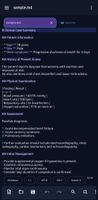
PlainForge screenshot 1
PlainForge screenshot 2

Cost / License

  • Free
  • Proprietary

Application type

Platforms

  • Android
1like
0articles

Features

Properties

  1.  Privacy focused
  2.  Support for Themes
  3.  Lightweight
  4.  Distraction-free

Features

  1.  No Tracking
  2.  Support for MarkDown
  3.  Dark Mode
  4.  Code Formatting
  5.  Full-Text Search
  6.  Syntax Highlighting
  7.  No registration required
  8.  Works Offline
  9.  Ad-free

PlainForge News & Activities

Highlights All activities

Recent activities

PlainForge information

PlainForge was added to AlternativeTo by jadervasque on and this page was last updated .
No comments or reviews, maybe you want to be first?

Featured in Lists
A list with 173 apps by namdx1987 without a description.

List by Nam Pham with 173 apps, updated

Official Links

What is PlainForge?

Edit text and code on your device

PlainForge is a lightweight editor for Android made to open, create, edit and save text and code files with clarity. It prioritizes a local, simple, and focused experience suitable for notes, configurations, scripts, and structured files.

Key Features

• Edit text and code files with multiple tabs • Reopen recent files and bookmark • Browse folders authorized by you in Android's file chooser • Use search and replace in normal, extended and regular expression modes • Count on syntax highlighting for Markdown, XML, HTML, JSON, Kotlin, Java, JavaScript, CSS, Python, YAML, INI and logs • Format JSON and XML quickly • Adjust local editor preferences, including app language

Secret area

Create files in an encrypted, PIN-protected local vault. Secret area files remain on the device and have no PIN recovery.

Local privacy

PlainForge does not declare internet permission. Access to files is limited to documents and folders that you explicitly choose through Android's file chooser.