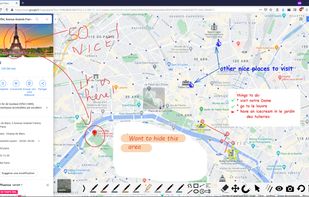
ppInk is an on-screen annotation software under Windows, forked from gInk.
ppInk introduces new features compared to gInk, greatly inspired by another screen annotation software Epic Pen, but even more easy to use. ppInk / gInk are made with the idea kept in mind that the interface should be simple and should not distract attention of both the presenter and the audience when used for presentations.
A set of drawing tools are introduced: Hand Writing, Line (2 points and polyline), Rectangular, Ellipsis, Arrow, Numbering Tag, Text Left/Right aligned, cliparts
In order to reduce the number of buttons, some buttons have multiple functions, selected my multiple click on those:
Hand / Rectangular / Ellipsis :
unfilled drawing -> filled with pen color -> filled with white -> filled with black
Line: 2 points -> polyline -> pen color filled polygon -> white filled polygon -> black filled polygon
Numbering :
transparent background -> edit tag Number -> white background -> black background
Arrow : Arrow draw at the beginning -> Arrow draw at the end
Text: Left /Right aligned
Move / Edit / Copy
Cliparts: Open the dialog to select image and the background/frame.
Magnetic The magnet activates some magnetic effect.
video recording: ppInk has now some capability to do some video recording control(OBS studio or ffmpeg)
UI customisation / translatable (many languages already available)
Pointer





Comments and Reviews
is free, best than others free tools in resources and is easy to use