




Qoppa PDF Studio
85 likes
Create, Convert, Review and Edit PDF Documents on Windows, macOS, and Linux.
Cost / License
- Pay once
- Proprietary
Application typeApplication types
Platforms
- Mac
- Windows
- Linux
- Chrome OS

Features
Qoppa PDF Studio News & Activities
Highlights All activities
Recent News
No news, maybe you know any news worth sharing?
Share a News TipRecent activities
 Nettongia added Qoppa PDF Studio as alternative to Nettongia PDF Editor
 noshudotnet added Qoppa PDF Studio as alternative to PDF Toolbox
 GetPdf added Qoppa PDF Studio as alternative to PDF Guard
 OrdinaryPerson added Qoppa PDF Studio as alternative to PDFx (by AlexandrosGounis)
 PDFluent added Qoppa PDF Studio as alternative to PDFluent
 mhrsntrk added Qoppa PDF Studio as alternative to Velum Privacy
- pdfops liked Qoppa PDF Studio
 bgalvan added Qoppa PDF Studio as alternative to No Bloat PDF
 doc-inspector added Qoppa PDF Studio as alternative to DocInspector
 sanusihassan added Qoppa PDF Studio as alternative to PDFEquips




Featured in Lists

A list with 807 apps by AmileyaRyver without a description.
List by AmileyaRyver with 807 apps, updated

A list with 209 apps by trishafhhmoam without a description.
List by Trisha Hoque with 209 apps, updated
What is Qoppa PDF Studio?
Qoppa PDF Studio Videos
Qoppa PDF Studio information
Developed by
 Qoppa Software
 Licensing
Proprietary and Commercial product.Pricing
One time purchase (perpetual license) ranging between $99 and $139.Rating
Average rating of 3.2Alternatives
195 alternatives listedBadge
Get an embeddable badge for Qoppa PDF StudioSupported Languages


Comments and Reviews
I was happy with the editing abilities since version 8. Running on Ubuntu Mate 16.10 I print plans very often to wide plotters and often need to print several small detail sheets per page. Before version 11 I had a lot of problems printing, to the point that I couldn't print a standard 8.5 x 11 on my HP Officejet 8600 Pro without major scaling issues. To the point that I had to use adobe reader 9 to print any PDFs. Version 11 has been a much-needed update for the Linux community. Great job adding requested features.
Also, this software isn't cheap, but It is an excellent set of tools for anyone running Linux in a business that requires lots of printing. I've tried Foxit Reader, Master PDF editor, qpdfview (which I use as default viewer because of its excellent speed with large documents) and this really is the only product that is complete, actively developed, and offers much better than expected customer support.
On windows I use PDF-x-Change Pro and recommend it to anyone using windows, Although PDF Studio may now be worthy competition.
It does not allow images and text to be rotated at any angle.
Don't understand if future updates will be free of charge with this expensive ~$170 perpetual license: "...The license is perpetual and allows to continue using the purchased version of our software... Any upgrade to future major versions is optional". Two weeks refund policy is also a bit shady to me: "...we will refund your order within 2 weeks of purchase. A 5% charge on the order total might be applied, with a minimum of $5, for credit card and processing fees". You also have to contact support first, then complete a form asking for refund... etc. etc.
This software is a great tool for viewing PDF files, especially geoPDFs for mapping purposes. The software is lightweight, easy on RAM and battery, and allows for individual layers to be turned on and off. The only issues I've had with it are the controls being difficult to see in direct sunlight.
Awesome alternative to Adobe Reader
The free version is only a reader, and that’s okay. But I can’t find the Standard version on their website (as of August 2024), which is announced here on AlternativeTo, only the Pro version, which costs 179 $ for a single license (1 User on 2 Computers), which is quite expensive, compared to competitor products.
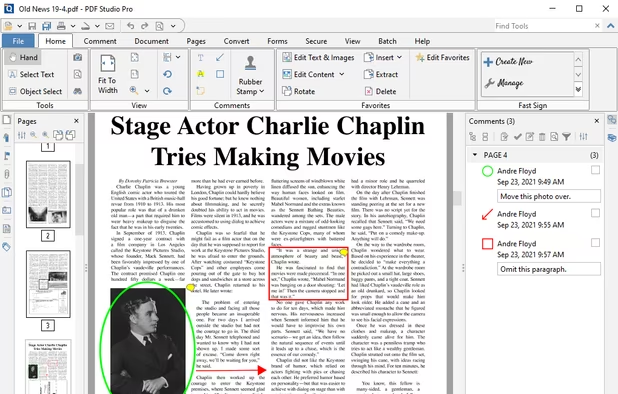
The 2024 version of PDF Studio Pro is great! I have used it on some very large documents (over a gigabyte) and it handles even the largest with ease. These are the features I have used: Pencil feature - This works well on my surface pro. I can use the pen to draw and write comments on documents, and the marker to highlight text. Page resize - I have used this to resize from A4 to letter. As well as resizing the page, you can also scale the contents which is very handy! Redacting - I have used the redaction feature to cut sensitive information from documents. I was able to mark the areas to be redacted and then apply them in one hit. Works great! The 2024 version of PDF Studio Pro is quick and responsive. I recommend it. https://www.qoppa.com/pdfstudio/
Qoppa PDFStudio for Life.... So I was looking to use Javascript for Custom Calculations and Custom Actions on a Form Filled PDF.
This allows me to make fields disappear or fill with conditional answers when a tick box is selected or a different field has data entered into it (which is just for little tinkering projects I'm doing in my spare time)
So like everyone else in the world I went to Adobe to get a copy of the current version only to find that Adobe no longer support any software that doesn't come with a monthly subscription fee.
To make matters worse, the monthly subscription fee equals $347.82 per year for their PRO version (which is the only version that can do Javascript Custom Calculations and Actions).
So I went searching the internet to find another PDF editor that can do this and after weeks of Free trials and multiple heartbreaks, I discovered Qoppa PDF Studio.
Not only does it have everything built-in for Javascript Custom Calculations, Custom Actions and all the other usual features we've all come to expect from any good PDF editor but it comes with a ONE OFF price that doesn't break my bank account.
Qoppa, You are the Best! 10/10 Keep up the good work! https://www.qoppa.com/pdfstudio/