Quick Access Popup icon

Quick Access Popup

The freeware Quick Access Popup (QAP) lets you move like a breeze between your frequently used folders, documents, applications, web pages and much more!
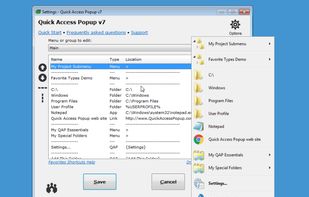
Quick Access Popup screenshot 1

Cost / License

  • Freemium (Pay once or Subscription)
  • Proprietary

Application type

Platforms

  • Windows
24likes
0articles

Features

Properties

  1.  Lightweight

Features

  1.  Portable
  2.  Ad-free
  3.  Folders
  4.  Launcher
  5.  File Search
  6.  Support for Hotkeys
  7.  Application Launchers

Quick Access Popup News & Activities

Highlights All activities

Recent News

No news, maybe you know any news worth sharing?
Share a News Tip

Recent activities

  • jdakfkj333 replied to a comment / review on Quick Access Popup
  • lian00 reviewed Quick Access Popup  

    A very handy tool to launch files, programs, URL and so on. I use it in conjunction with Listary as it’s easier to launch a favorite through QAP. Menus are easy to manage, you can customize the icons (great feature) and customize the conditions of launching of the program (exclude/include).

    I have to mention some problems I meet with QAP :

    1. it breaks some exotic french keyboard layers (because it’s developped under an old Autohotkey version);
    2. I cannot prevent the popup menu to show when...
  • lian00 replied to a comment / review on Quick Access Popup
  • sabtnam liked Quick Access Popup
  • brokesimp69 liked Quick Access Popup
  • jdopen liked Quick Access Popup
  • kamoltuk2001 liked Quick Access Popup
  • Kando icon
    MuratL added Quick Access Popup as alternative to Kando

Comments and Reviews

   
Comment summary: Quick Access Popup earns praise as a fast, customizable Windows launcher and folder navigator that reduces desktop clutter and streamlines routine work. Users value its menus, icon customization, workflow automation, developer responsiveness, and support for applications, files, URLs, snippets, and scripts. One review criticizes donation prompts, while another reports keyboard-layer and Tourbox conflicts. Its tray-based design suits frequent folder access, though preferences vary.
Top Positive Comment
Dan A
3

Switched to Quick Access Popup from Listary as I only need a quick project folder navigator with middle-mouse button click. Pretty good interface and good customization. Four stars since I only started using and don't know how it performs long term.

Top Negative Comment
Sam Lander
-2

The current reviews of this software are full of people with this as the only thing that they reviewed.

This one, obscure piece of software.

1-star for unethical practices by the developer/owner of the software.

lian00

Could you explain and give reference to this ?

Sam Lander
Replying to @lian00

@lian00 Just take a look at the likes/reviews. A bunch have only liked and reviewed this product and nothing else ever again.

lian00
0

A very handy tool to launch files, programs, URL and so on. I use it in conjunction with Listary as it’s easier to launch a favorite through QAP. Menus are easy to manage, you can customize the icons (great feature) and customize the conditions of launching of the program (exclude/include).

I have to mention some problems I meet with QAP :

  1. it breaks some exotic french keyboard layers (because it’s developped under an old Autohotkey version);
  2. I cannot prevent the popup menu to show when using Tourbox. And I use a lot Tourbox. There is an option to pause the program, but it’s quite boring as you may need it when you are working with Tourbox.
SouzaRM
-1

Excellent !

Good job, @Jeanlalonde...

This APP helps me a lot with routine tasks on the computer.

Thanks !

TBayAreaPat
0

This is the type of jump-to program you use when you have an ongoing need to get to certain folders. I was hoping to find a context menu program of this type, but others may like this tray area format.

Vernon Blake
2

Quick Access Popup (QAP) consistently helps boost my productivity, keep me on schedule, and reduce the time and hidden costs spent performing redundant tasks. Not a day goes by after logging into my PC that I don't use this indispensable tool. QAP enables me to efficiently navigate project folders, organize and access important client files and essential Windows programs, and automate workflows using built-in text snippet functionality and integrating AutoHotKey scripts. Since September 2014, I've been a dedicated fan, user, and supporter of QAP when it was first known as "Folders Popup." I especially appreciate the excellent support provided by Jean Lalonde, QAP's developer, which often exceeds that offered by my paid apps!

Peter
1

This is a brilliant piece of software! You just can't help making a donation to the author! It has no "Alternative To" ))

7 of 11 comments

Featured in Lists

List of all the windows apps

List by rahulsaigal with 99 apps, updated

A list with 12 apps by wchjr56 without a description.

List by wchjr56 with 12 apps, updated

Official Links

What is Quick Access Popup?

The freeware Quick Access Popup (QAP) lets you move like a breeze between your frequently used folders, documents, applications, web pages and much more!

Save thousands of clicks while browsing your favorite folders in windows explorer or file dialog boxes. Launch your most used applications, documents or web sites instantly with this easy popup menu and mouse/keyboard shortcuts manager. Gather related favorites in submenus. Assign favorites or submenus to keyboard or mouse shortcuts. Or group favorites and launch them in one click.

To launch the popup menu, click the QAP icon in the notification zone, hit the middle mouse button or press windows + W (these triggers can be changed in options). In the settings window, customize your QAP menu. Review shortcuts assigned to favorites or submenus in the hotkeys window.

To quickly add a new favorite folder to your popup menu: 1) go to a frequently used folder, 2) click the QAP hotkey and choose add this folder, 3) give the folder a short name and save it.

In the my QAP essentials menu, choose the switch menu to switch to any other running explorer or application window. Use the reopen a folder menu to reopen one of the folders already open in an explorer window (very useful in file dialog boxes). Choose the recent folders menu to show an updated list of the windows recent folders. Access the files or URLs in your clipboard with the clipboard menu. Click the drives menu to see the list of drives with current disk space.

In the options dialog box, choose your preferred language, menu icons size, windows colors. Select the number of recent folders to display, add numeric keyboard shortcuts to the folders menu or shortcut reminders. Pin the popup menu at a fix position or remember the settings window position.

All this for free in very intuitive app. Quick Access Popup is available on Windows 7 and more recent. Works with Windows Explorer, Directory Opus, Total Commander and 15 other file managers.

Quick Access Popup Videos

Quick Access Popup information

  • Developed by

    CA flagJean Lalonde
  • Licensing

    Proprietary and Freemium product.
  • Pricing

    One time purchase ranging between $40 and $1199, and / or subscription ranging between $1 and $30 per month + free version with limited functionality.
  • Rating

    Average rating of 4.4
  • Alternatives

    16 alternatives listed
  • Badge

    Get an embeddable badge for Quick Access Popup
  • Supported Languages

    • English

AlternativeTo Categories

File ManagementOS & Utilities

Popular alternatives

View all

Our users have written 11 comments and reviews about Quick Access Popup, and it has gotten 24 likes

Quick Access Popup was added to AlternativeTo by jlalonde on and this page was last updated .
