
Radix icon
Radix icon

Radix

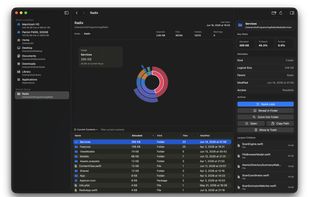
A fast, native macOS disk space analyzer that helps you find where your storage is going. Scan any folder or volume, explore results with an interactive sunburst chart and file browser, and clean up — all without leaving the app.
Radix screenshot 1

Cost / License

  • Free
  • Open Source (MIT)

Application type

Platforms

  • Mac
0likes
0comments
0articles

Features

Properties

  1.  Privacy focused

Features

  1.  Ad-free
  2.  Dark Mode
  3.  No registration required
  4.  Works Offline
  5.  No Tracking
  6.  Drag and Drop

Radix News & Activities

Highlights All activities

Recent activities

Radix information

  • Developed by

    US flagColin Kim
  • Licensing

    Open Source (MIT) and Free product.
  • Written in

  • Alternatives

    51 alternatives listed
  • Supported Languages

    • English

AlternativeTo Category

System & Hardware

GitHub repository

  •  321 Stars
  •  6 Forks
  •  2 Open Issues
  •   Updated  
View on GitHub
Radix was added to AlternativeTo by Paul on and this page was last updated .
No comments or reviews, maybe you want to be first?

What is Radix?

A fast, native macOS disk space analyzer that helps you find where your storage is going. Scan any folder or volume, explore results with an interactive sunburst chart and file browser, and clean up — all without leaving the app.

Why Radix?

Storage fills up quietly. Radix makes it obvious where it went — no Terminal commands, no waiting through recursive scans that crawl forever. Point it at a folder, sit back, and explore a visual breakdown of every directory and file.

It's built from scratch in Swift and SwiftUI, designed to feel like a natural part of macOS.

Features:

Scanning

  • Iterative file system traversal
  • Real-time progress with smooth, blended metrics so you know how far along things are
  • Auto-summarization — directories with thousands of tiny files get collapsed into a single node
  • Respects permissions — works on ordinary folders without special privileges; warns you when protected paths (Mail, Safari, Messages) are skipped

Visual Exploration

  • Sunburst chart — a radial treemap that shows your disk usage at a glance. Hover any segment to see what it is, double-click to drill down.
  • File browser — a sortable table with informative columns.
  • Smart search — filter just the current folder, or search the entire scan tree.
  • Breadcrumb navigation with back/forward history so you don't lose your place.

Built for macOS

  • Native SwiftUI app
  • Sidebar with Smart Locations (Macintosh HD, mounted volumes, Home, Desktop, Documents, Downloads, Library, Applications) and recent scans
  • Inspector panel showing detailed metadata: allocated vs. logical size, parent directory, access level, largest children
  • File actions — Reveal in Finder, Open, Copy Path, Move to Trash, all from context menus or the inspector
  • Drag & drop any folder into the window to scan it
  • Automatic updates powered by Sparkle

Privacy & Permissions

Radix works out of the box on any folder you can already access. For folders like ~/Library or Mail data, macOS may require Full Disk Access. Radix detects when files are skipped due to permissions and guides you through enabling it in System Settings — one click, no guesswork.

Official Links
