


TreeSize
305 likes
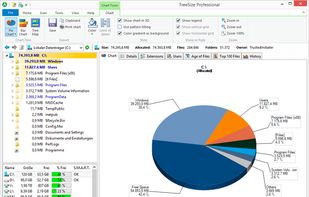
Comprehensively analyze disk space usage with TreeSize across local, network drives, and mobile devices. Features include folder sizes, subfolders, file counts, NTFS compression rates, interactive 3D charts, and the ability to target large, temporary, and duplicate files, even via MTP and WebDAV.

Cost / License
- Freemium (Subscription)
- Proprietary
Application typeApplication types
 EU
EUPlatforms
- Windows
- PortableApps.com


Features
TreeSize News & Activities
Highlights All activities
Recent News
No news, maybe you know any news worth sharing?
Share a News TipRecent activities
 Lekano-production added TreeSize as alternative to CleanMyWin
 iwadjp added TreeSize as alternative to disk-insight
 1barun added TreeSize as alternative to Drive Sonar
Quickly shows what’s taking up space. I use it once a week to free up space.
- Chezpuffboi liked TreeSize
- Cubium liked TreeSize
 Fopull added TreeSize as alternative to Storage Sifter
 Hansjoerg-Hofer added TreeSize as alternative to Diskraptor
 Kiord added TreeSize as alternative to SpaceBrowser


Featured in Lists

Master List of all Apps and Software I use for both work and personal life.
List by Jimmy Briggs with 416 apps, updated

A list with 807 apps by AmileyaRyver without a description.
List by AmileyaRyver with 807 apps, updated

I use these software on Windows
List by yaqinking with 63 apps, updated
What is TreeSize?
TreeSize Videos
TreeSize information
Developed by
 Jam
Jam Licensing
Proprietary and Freemium product.Pricing
Subscription ranging between $2 and $42 per month + free version with limited functionality.Rating
Average rating of 4Alternatives
114 alternatives listedBadge
Get an embeddable badge for TreeSizeSupported Languages


Comments and Reviews
I have loved, and continue to love, TreeSize Free for many, many years (more than 10 years and counting). Whenever I get a new computer it is one of the first things I install.
It is simple, fast and unbloated. So many disk usage analytic tools waste their efforts on fancy looking charts but don't help the user with their most essential goal - to quickly identify exactly what is using the most space on their storage device.
TreeSize Free, however, excels at this. It quickly analyzes your hard drive (for example, one of my drives had over 480,000 files using over 950G of space, TS Free analyzed the entire drive in under 20 seconds). It presents your entire drive as an interactive tree sorted by file size (or even file counts, if you prefer), allowing you to expand or collapse each directory so you can quickly zoom in on exactly what you need to remove in order to free up the most space in the shortest amount of time.
As an example, I launched TS Free on one of my computers. This one has a 1TB drive but less than 60G free space remaining. I knew it had lots of downloads and photos - but not that much! What was taking up so much space?? It took TS Free 17 seconds to analyze this drive. Right away the problem is revealed - over 460G is consumed by 18 files in "C:\System Volume Information". After a quick online search I found that these are system restore points, and the amount of space they occupy is configurable via the system protection utility in W7 (but that's a topic for another day). All I had to do was adjust the system protection options to reduce the restore point disk consumption. But the important point here is that I quickly got to this solution with excellent assistance from TreeSize Free.
The biggest limitation of the free version (AFAIK) is that it won't analyze network drives. That hasn't been a big issue for me, so I haven't had to opt for the Pro version.
[Edited by rmbjr60, April 26]
I first paid for TreeSize in 2006. I paid for many upgrades after that, and stopped being willing to upgrade a year or two ago.
It's pretty good at what it does, but it's not groundbreaking.
At some point several years ago, the update function in TreeSize stopped working. I opened a ticket, and support blamed Windows. Seriously.
So, I stuck with my version, which wasn't terribly old. It worked fine, until the other day. When I tried running it, it threw a fit about the license (which was valid). Refusing to deal with any more nonsense, I removed it, and I'll never use it again.
Quickly shows what’s taking up space. I use it once a week to free up space.
This tools is great if you need to free up some diskspace on a drive, but don't know where to start.
TreeSize is the fastest around. The tree view does nothing for me. Though the bar charting is similar to DiskSavvy, I prefer the layout of DiskSavvy.
You really need this for cleaning up your pc! Does everything you could wish for!
Best one out there for windows.