





disk-insight
Like
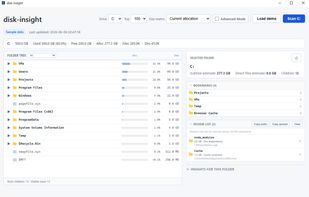
disk-insight is a local-only disk usage viewer for Windows. It reads NTFS Master File Table (MFT) data directly for fast scanning and presents the result as a tree-first view, so you can expand folders and see where storage is used before deciding what to review.

Cost / License
- Free
- Open Source (MIT)
Application type
Platforms
- Windows


Features
disk-insight News & Activities
Highlights All activities
Recent activities
- iwadjp updated disk-insight
- iwadjp added disk-insight
 iwadjp added disk-insight as alternative to WizTree, WinDirStat and TreeSize


disk-insight information
Developed by
iwadjpLicensing
Open Source (MIT) and Free product.Written in
Alternatives
3 alternatives listedBadge
Get an embeddable badge for disk-insightSupported Languages

AlternativeTo Category
System & HardwareGitHub repository
- 0 Stars
- 0 Forks
- 0 Open Issues
- Updated


No comments or reviews, maybe you want to be first?