




RoboForm
95 likes
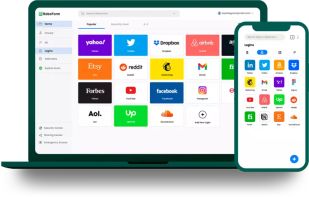
RoboForm is a robust password management software that simplifies the task of securely storing and syncing passwords across various devices and browsers, including Firefox, Chrome, Safari, Opera, Edge, Android, and iOS.

Cost / License
- Freemium (Subscription)
- Proprietary
Application typeApplication types
Platforms
- Mac
- Windows
- Android
- iPhone
- Android Tablet
- iPad
- Microsoft Edge
- Google Chrome
- Opera
- Brave
- Mozilla Firefox


Features
RoboForm News & Activities
Highlights All activities
Recent News
No news, maybe you know any news worth sharing?
Share a News TipRecent activities
 eGGenius added RoboForm as alternative to CApp Store
 POX added RoboForm as alternative to Sesame Password Manager
- Markus-Lind added RoboForm as alternative to NativePass
 jsussanchez added RoboForm as alternative to Easy Pass Login
 lockdownkeysweb added RoboForm as alternative to Lock Down Keys



Featured in Lists

A list with 144 apps by Nemets39 without a description.
List by Nemets39 with 144 apps, updated

Using the **same password for several accounts** (messaging, social networks, online services, bank accounts...) can...
List by Paul with 10 apps, updated

Bookmark Sites
List by Ashley Slack with 26 apps, updated



What is RoboForm?
RoboForm Videos
RoboForm information
Developed by
 Siber Systems, Inc.
 Licensing
Proprietary and Freemium product.Pricing
Subscription ranging between $2 and $4 per month + free version with limited functionality.Rating
Average rating of 4.8Alternatives
194 alternatives listedBadge
Get an embeddable badge for RoboFormSupported Languages
AlternativeTo Categories
Security & Privacy, Backup & Sync, Web Browsers, File Sharing, Online ServicesApple AppStore
- Updated
- 4.73 avg rating


Comments and Reviews
I have a bad memory, this app really do a great help for me.
Recent info: RoboForm's free version allows you to store an unlimited number of passwords, not just 10. However, it comes with some limitations: One device only: You can only use RoboForm on a single device with the free plan. No web vault access: The web portal, where you can manage passwords and access security tools, is not available with the free version. Limited sharing: You can send individual passwords, but cannot securely share folders with others or grant emergency access. Basic email support: Only email support is available for free users.
I gave it a try, and it's how I remembered it.. like the Borg.. It gets in and it's sort of unstoppable. I do actually like the program, but it's something I don't want on my main drive. RoboForm is still evolving.
To be fair, I didn't realize it has settings to prevent going to different browsers. Will try again because BitWarden and KeePass aren't really form fillers.
I've been using Roboform on my Mac, iPad, iPhone, and office PCs for more than a decade (almost 2). It's always been reliable and never lacked for functionality. The few times I've ever contacted the support team, they never let me down. Given how affordable subscriptions are, RoboForm is one of the best value apps I have.
longtime paid user across all devices.
LastPass has a nice design, but it's a BAD IDEA! It relies upon SSL. The Heart Bleed flaw proved SSL should not be relied upon. If LastPass were redesigned to not utilize SSL it would be fine. I cannot speak to RoboForm's other versions, but the Windows version stores your data on your own machine, with no SSL "protecting" your master password. Keepass has two flaws. A rude-sounding name, and ridiculously manual controls.
My conclusion is that if you want to have a modern web "experience", then use RoboForm. Well, you could also use LastPass, but comparatively MUCH more risky. A form filler and password manager, with seamless integration (eventually websites will facilitate this with more direct communication) is as important to the web as the hyperlink, especially as security becomes more and more important.
Lots of bad comments about Roboform's toolbar don't make sense. Every web browser lets you hide toolbars.
Roboform's mobile app does not require a premium subscription unlike lastpass.
Addon for Opera: https://addons.opera.com/addons/extensions/details/roboform-lite/