




TaggedFrog
27 likes
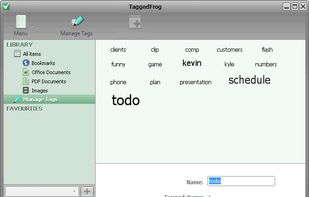
Based on the convenient drag ’n’ drop technique, TaggedFrog allows you to organize your files, documents and Web links. Just add objects to the library and tag them with any keywords. That’s it. You can forget the file name or where the file is located, but dont worry - the tags...

Platforms
- Windows

Discontinued
Reportedly no updates since 2010. Archive.org shows no updates in at least 5 years. See https://web.archive.org/web/20151026015411/http://lunarfrog.com/projects/taggedfrog/download

Features

TaggedFrog News & Activities
Highlights All activities
Recent activities
No activities found.
Featured in Lists

A list with 328 apps by christineconnor without a description.
List by christineconnor with 328 apps, updated

A list with 54 apps by christineconnor without a description.
List by christineconnor with 54 apps, updated

A list with 150 apps by christineconnor without a description.
List by christineconnor with 150 apps, updated
What is TaggedFrog?
TaggedFrog information
Developed by
 Lunar Frog Software (Andrei Marukovich)
 Licensing
Proprietary and Free product.Alternatives
25 alternatives listedBadge
Get an embeddable badge for TaggedFrogSupported Languages


Comments and Reviews
Tagging works best for a lot of files, right? That's why you'd use tags: when simple folders are insufficient, considering the complexities of sorting lots and lots of photos or illustrations. But with this software you have to add each and every file individually by drag and drop if you want to tag it. At 2k photos this is not a viable solution for me.
There is a "Daminion" - tag software for photos.
There's methods other than drag n'drop.. you can add by folder, scan & tag.. but I'm just starting and notice that my tag settings seem to have gotten lost.
Still haven't found anything better. It is a pity that the project died.
I installed TaggedFrog in Vista business 64 bit, but I got an errormessage, each time, if I started the program: "Application can't open the library". I tried it with 2 installation folders: C:\Program Files (x86)+BS\TaggedFrog; C:\Program Files (x86)\1EM\TaggedFrog. Because of this I had to deinstall TaggedFrog.