

Thicket icon
Thicket icon

Thicket

Combines project tasks, message threads, documents, files, schedules, kanban boards, and chat in shared workspaces. Teams can assign work, set due dates, track progress and project health, run recurring check-ins, and give clients selected access for recorded approvals.
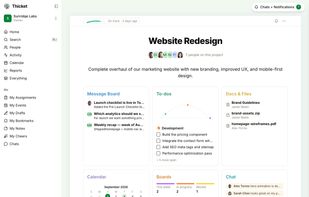
A project's home: six tools, one calm page.

Cost / License

  • Freemium (Subscription)
  • Proprietary

Application type

Platforms

  • Online
  • iPhone
  • iPad
  • Software as a Service (SaaS)
0likes
0articles

Features

  1.  Calendar View
  2.  Two-factor Authentication
  3.  Kanban Board
  4.  Support for @mentions
  5.  Calendar Integration
  6.  WYSIWYG Support
  7.  Team Collaboration

Thicket News & Activities

Highlights All activities

Recent activities

  • POX updated Thicket
  • POX updated Thicket
  • ThicketHQ updated Thicket
  • ThicketHQ updated Thicket
  • ThicketHQ updated Thicket
  • ThicketHQ updated Thicket
  • Danilo_Venom updated Thicket
  • ThicketHQ added Thicket
  • POX updated Thicket
  • Basecamp icon
    ThicketHQ added Thicket as alternative to Basecamp, Asana, ClickUp and monday.com + 6 similar activities

Thicket information

  • Developed by

    CA flagVesperion Gate Inc.
  • Licensing

    Proprietary and Freemium product.
  • Pricing

    Subscription ranging between $20 and $49 per month + free version with limited functionality.
  • Alternatives

    6 alternatives listed
  • Badge

    Get an embeddable badge for Thicket
  • Supported Languages

    • English
Thicket was added to AlternativeTo by ThicketHQ on and this page was last updated .
No comments or reviews, maybe you want to be first?

Official Links

What is Thicket?

Keep tasks, messages, files, boards, and deadlines together. See recent project work and upcoming dates on iPhone and iPad.

Thicket is project management software for keeping tasks, conversations, files, and deadlines together. Give each project a shared place to work, with the same project tools on iPhone and iPad.

See what needs attention Browse your projects from Home, check recent work in project previews, and open your assignments or Inbox. Follow project health and progress, see overdue work, and check upcoming deadlines across projects.

Organize the work • To-dos: organize tasks into lists and groups, assign people, set due dates, and add subtasks or recurring work. • Boards: move cards through columns, assign people, track steps, and put work on hold when it needs to wait. • Calendar: schedule events and recurring meetings, see dates across projects, and add selected project calendars to your calendar app.

Keep the context with the project • Message Board: post announcements and updates, with comments and reactions grouped by topic. • Docs & Files: write documents, upload files, and organize them in folders. • Chat: talk with your project team or send direct messages. • Check-ins: ask recurring questions and collect the team's answers in one place.

Work with your team and clients Invite people to the projects they need. Give clients access to selected work and collect approvals. Follow mentions, assignments, and replies in your Inbox, and set quiet hours for notifications.

Use light or dark mode and adjust text size to suit your device. Drafts help you return to unfinished work.

A Thicket account is required because your projects and conversations belong to your private workspace.
