Time Blokker icon
Time Blokker icon

Time Blokker

A day planner that actually survives your day. Give every task a real duration, stack them in your day, drag and drop to rearrange, and watch your plan adapt when things change.
Time Blokker screenshot 1
Time Blokker screenshot 2
+4
Time Blokker screenshot 3

Cost / License

  • Freemium (Pay once)
  • Proprietary

Platforms

  • iPhone
  • iPad
  • Android
1like
0articles

Features

Properties

  1.  Lightweight
  2.  Privacy focused

Features

  1. Google Calendar icon  Sync with Google Calendar
  2.  No registration required
  3.  Cloud Sync
  4.  Reminders
  5.  Ad-free
  6.  No Tracking
  7.  Dark Mode
  8.  Calendar Integration
  9.  Works Offline

Time Blokker News & Activities

Highlights All activities

Recent activities

Time Blokker information

  • Developed by

    NL flagSietse van Vliet
  • Licensing

    Proprietary and Freemium product.
  • Pricing

    One time purchase (perpetual license) that costs $7 + free version with limited functionality.
  • Alternatives

    9 alternatives listed
  • Badge

    Get an embeddable badge for Time Blokker
  • Supported Languages

    • English
    • Spanish
    • Chinese
    • Dutch
    • Italian
    • Korean
    • German
    • French

AlternativeTo Category

Office & Productivity
Time Blokker was added to AlternativeTo by Theun V on and this page was last updated .
No comments or reviews, maybe you want to be first?

Official Links

What is Time Blokker?

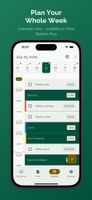
Your to-do list looks manageable. It isn't. Tasks hide how long they take. Time Blokker gives every task a duration and stacks them in your day. You see what fits before you start.

Your plans don't fail because of you. They fail because they can't adapt. One thing takes longer, someone calls, lunch runs late, and suddenly your whole afternoon is off. In Time Blokker, tasks sit on top of each other. When one grows, everything below it moves down. Your plan adjusts on its own.

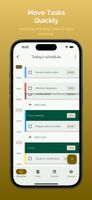
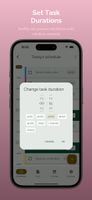
Need to shuffle things around? Drag a task somewhere else. Tap the duration to make it shorter or longer. Done. Takes two seconds. That's why you'll actually replan when you need to, instead of giving up on the whole day.

And when your priorities take up real space in your day, not just lines on a list, it gets a lot easier to decide what matters. The big stuff looks big. The small stuff looks small.

When you finish what you actually planned to do, something changes. You trust tomorrow's plan a little more. And the day after that.

No account needed. No subscription. Pay once, it's yours. Your tasks stay on your device. We don't see them, we don't track them.

Features:

  • Drag-and-drop task planning
  • Tasks shift automatically when your plan changes
  • Adjustable task durations
  • Day schedule + task list in one app
  • Progress tracking throughout the day
  • Apply schedules to a day
  • Multi-select and edit
  • Color coded tasks
  • Task duplication
  • Move tasks between lists
  • Dark mode
  • No account required
  • No subscription, one purchase, yours forever
  • Your data stays on your device