





Video Squisher
1 like
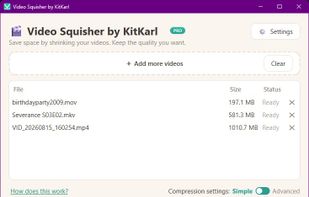
A local desktop utility that makes video files smaller by analyzing and re-encoding them in AV1 or HEVC. Choose a visual-quality level for automatic compression, or enter an exact file-size limit for email, messaging, and upload requirements; originals remain untouched.

Cost / License
- Freemium (Pay once)
- Proprietary
Application type
Platforms
- Mac
- Windows
- Linux

Features
Video Squisher News & Activities
Highlights All activities
Recent activities
 Danilo_Venom added Video Squisher as alternative to VideoCompress.dev
 roryk added Video Squisher as alternative to Clip Squeezer
- JacobsLadders liked Video Squisher
- JacobsLadders added Video Squisher
- Fla updated Video Squisher
- JacobsLadders updated Video Squisher
 JacobsLadders added Video Squisher as alternative to FFmpeg, Avidemux, Shutter Encoder and VidCoder


Video Squisher information
Developed by
 KitKarl
 Licensing
Proprietary and Freemium product.Pricing
One time purchase (perpetual license) ranging between $9 and $29 + free version with limited functionality.Alternatives
53 alternatives listedBadge
Get an embeddable badge for Video SquisherSupported Languages


No comments or reviews, maybe you want to be first?
Featured in Lists
A simple list for any desktop video compression, with most simple and less technical at the top, and more technical at...
List by Jacob Zabrowki with 6 apps, updated