




VideoPad
71 likes
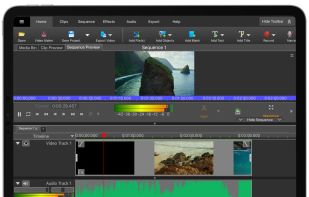
Comprehensive video editor with over 50 visual effects and transitions, offering real-time previews and fully adjustable parameters. Supports diverse audio/video formats, adds photos and text, and enables sharing on DVDs, HD DVDs, Blu-Ray, mobile devices, or online. Free and professional versions available.

Cost / License
- Freemium (Pay once or Subscription)
- Proprietary
Application type
Platforms
- Mac
- Windows
- Android
- iPhone
- Android Tablet
- iPad
- Kindle Fire


Features

VideoPad News & Activities
Highlights All activities
Recent News
No news, maybe you know any news worth sharing?
Share a News TipRecent activities
 POX added VideoPad as alternative to Palmier Pro
 Ribor added VideoPad as alternative to PrismPoster
- nch updated VideoPad
- nch updated VideoPad






Featured in Lists

A list with 422 apps by AmileyaRyver without a description.
List by AmileyaRyver with 422 apps, updated

For Android & Online
List by omiom35 with 17 apps, updated

A list with 28 apps by RemovedUser without a description.
List by RemovedUser with 28 apps, updated




What is VideoPad?
VideoPad Videos
VideoPad information
Developed by
 NCH Software
 Licensing
Proprietary and Freemium product.Pricing
One time purchase ranging between $99 and $159, and / or subscription that costs up to $8 per month + free version with limited functionality.Alternatives
170 alternatives listedBadge
Get an embeddable badge for VideoPadSupported Languages
AlternativeTo Categories
Video & Movies, CD/DVD Tools, Photos & GraphicsApple AppStore
- Updated
- 3.95 avg rating


Comments and Reviews
Does not appear to have an android video editor.
Simple, powerful, all-round. A bit slow, however.
Sadly, this application changes your system quite a bit. For example, it associate itself with dat-files. And replacing dat-files icons with it's own. Why in the world would they do this? Dat-files are commonly used among sooo many applications and Windows too!
And you'll get a couple of useless apps installed at the same time you install VideoPad.
The application was a really good alternative for Windows Movie Maker since I wanted something simple but all the extra things is just too much. Choose another product.
I would suggest going with kdenlive witch is free and opensource and has a Windows build since many years now.
It is a simple to understand editor with multi-track compatibility. You can't export to mp4 after the trial expires, but exporting to avi works well enough for my purposes.
Pros
Cons
If you have a bad or old computer, or just want do some simple task, go on. But if you want work hard, you need to buy a better computer and try Vegas or Premiere.
yes this is best video editor i ever used with most of basic feature for simple task and multi convert (Adobe premiere cannot do this)
Even though the application itself absolutely does what it promises, the 'free for home use' suggestion is not correct. After 30 days you'll have to buy a license or it won't export DVD, MP4 or other formats. Basically that makes it useless unless you pay.
As of June 2021, there is no limitation. You may use the noncommercial free without restriction.
The software comes with an old-school windows GUI, which is a good thing (clean, intuitive, fast to work with, options not hidden). I tried Lightworks first but for an amateur like me its learning curve is super steep; here I was able to do things precisely as I wanted within half an hour: multiple audio and video tracks, effects timed by keypoints, trimming of tracks,... For non-professional use recommended!