
ViPER4Windows Redesigned icon

ViPER4Windows Redesigned

System-wide audio effects for Windows.
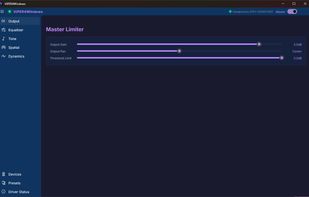
ViPER4Windows Redesigned screenshot 1

Cost / License

  • Free
  • Open Source

Application type

Platforms

  • Windows
1like
0articles

Features

Properties

  1.  Lightweight
  2.  Privacy focused

Features

  1.  No registration required
  2.  Works Offline
  3.  Ad-free
  4.  No Tracking
  5.  Dark Mode
  6.  Bass booster
  7.  Sound Effects

ViPER4Windows Redesigned News & Activities

Highlights All activities

Recent activities

ViPER4Windows Redesigned information

AlternativeTo Categories

Audio & MusicOS & Utilities

GitHub repository

  •  68 Stars
  •  4 Forks
  •  10 Open Issues
  •   Updated  
View on GitHub
ViPER4Windows Redesigned was added to AlternativeTo by TheEmperorArt on and this page was last updated .
No comments or reviews, maybe you want to be first?

What is ViPER4Windows Redesigned?

System-wide audio effects for Windows.

ViPER4Windows brings the ViPER audio processing engine to Windows. It installs as a Windows Audio Processing Object (APO) that hooks into the system audio pipeline and applies ViPER effects in real time to all audio output, with a modern Fluent UI front-end. Audio Effects

Effects are grouped by the page they live on in the UI:

Output Output Volume / Channel Pan / Master Limiter

Equalizer FIR Equalizer (10 / 15 / 25 / 31 bands) with importable/exportable EQ presets Dynamic EQ (per-band threshold / attack / release)

Tone ViPER Bass (Natural / Pure Bass / Subwoofer) and Bass Mono Psychoacoustic Bass Enhancement ViPER Clarity (Natural / OZone / XHiFi) Tube Simulator and AnalogX warmth Spectrum Extension (VSE)

Spatial Field Surround (stereo widening, mid image, depth) Differential Surround Stereo Imager (3-band width control) Headphone Surround+ (VHE) virtual surround for headphones Reverberation with full room modeling Auditory System Protection (CURe crossfeed)

Dynamics Playback Gain Control (AGC) and LUFS targeting FET Compressor and Multiband Compressor (5-band) Dynamic System headphone virtualization Speaker Optimization (speaker-only) ViPER-DDC device correction (.vdc profiles) Convolver with WAV/IRS impulse responses

App Features Fluent design UI with a system-tray icon Per-device profiles with automatic switching on output change Cross-platform preset format shared with ViPER4Android and ViPER4Mac Preset, DDC, convolver kernel, EQ, and Dynamic System import/export Command-line interface (v4w-cli) Optional start-at-boot In-app driver status and per-endpoint APO registration