





xplorer²
106 likes
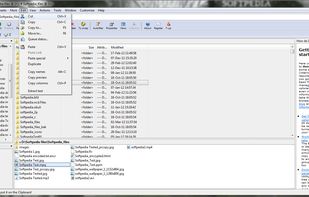
xplorer² is a desktop file manager combining the simplicity of Windows explorer with the speed and efficiency of traditional dual pane file managers.

Cost / License
- Pay once
- Proprietary
Application typeApplication types
 EU
EUPlatforms
- Windows


Features

xplorer² News & Activities
Highlights All activities
Recent News
- POX published news article about xplorer²
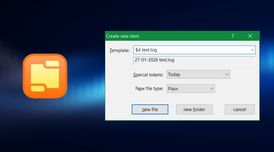 xplorer² 6.3 launches with Everything search integration, templated item creation and more
xplorer² 6.3 is now available for Windows users, introducing several notable workflow enhancements ...

Recent activities
- Corey-Skyname liked xplorer²
Xplorer2 is one swiss army tool for file management, I use it daily for my job, it will help me to organize my files all features are useful for anyone who cares having files and docs on fingertips. Developper is also responsive.. Hope this review is helpful to you.
 Maik-Hofmann added xplorer² as alternative to Peach Commander
- fromk-frank liked xplorer²
- POX updated xplorer²
 kodar_ninja added xplorer² as alternative to TheFile.Ninja
 mburlac added xplorer² as alternative to Empiric Commander
 Lumibear added xplorer² as alternative to SPAN Finder


Featured in Lists

A list with 328 apps by christineconnor without a description.
List by christineconnor with 328 apps, updated
What is xplorer²?
xplorer² information
Developed by
 zabkat Ltd.
 Licensing
Proprietary and Commercial product.Pricing
One time purchase (perpetual license) ranging between $30 and $50.Rating
Average rating of 4.2Alternatives
100 alternatives listedBadge
Get an embeddable badge for xplorer²Supported Languages


Comments and Reviews
Xplorer2 is one of the best programs in Windows that I used more than of 9 years. I can't image Windows OS without Xplore2. So fast and light (Native Programming) with too many options to customization.
Xplorer2 is one swiss army tool for file management, I use it daily for my job, it will help me to organize my files all features are useful for anyone who cares having files and docs on fingertips. Developper is also responsive.. Hope this review is helpful to you.
This lets me accomplish tasks so much quicker on my file server. I think anyone who runs any kind of server and manages files this is a must have. I have used this software for decades now and I haven't found anything better.
since installed in the early 2010s, I find it essential. When on occasion I see the system explorer I can't imagine working without side-by-side views and the complete toolbars. The few times I needed support there was immediate response from the developer.
xplorer² — A Powerful, Mature Dual-Pane File Manager
I first purchased xplorer² 14 years ago after using the lite dual-pane version. My current edition is xplorer² Ultimate, prized not only for its powerful features but also for its portability when needed away from my main setup.
My upgrade journey has been gradual, with each version improving features and fixes. I have also tested other dual-pane managers like Total Commander, Free Commander, Multi Commander, Double Commander, and Q-Dir. All are good, but once I committed to xplorer² 's learning curve, it was turned into a long-term investment.
Now, I use xplorer² as my default Windows file manager. It handles thousands of folders and files daily with ease—comparing, moving, merging, and syncing—delivering significant productivity gains.
Highlights:
Instantly swap or mirror dual panes with shortcuts.
Easily stack multiple tabs within and across panes.
Mirrored browsing through all folder levels for thorough comparison.
Innovative scrap panes support drag-and-drop, flat browsing, and search.
Extensive customization: toolbars, columns (including Miller), macros, color coding, and more.
Robust features: command line, advanced search, filters, comparison, and sync.
Excellent bookmarking and nearly unlimited view options.
Strong developer support with detailed help and videos.
Suitable for casual and power users.
Wishlist:
Drag-and-drop tabs between panes (like Q-Dir).
Support for more than two panes.
Integration with Everything search by voidtools.
A few modern themes to liven the interface.
So many features... I love it !
I’ve been using xplorer² Ultimate for the past two weeks, and it has quickly become my go-to file manager. What sets it apart for me is the dual-pane interface with multiple tabs – it makes working across several folders at once extremely efficient.
The level of layout customization is another highlight. You can tweak the interface until it feels exactly right for your workflow, whether you want a clean minimal look or a full power-user setup.
The built-in mass renamer is a lifesaver when dealing with large sets of files, and the bookmarks make navigation incredibly fast – I can jump to my most-used directories in a second. I also appreciate the way it shows the size of subfolders at a glance, something Windows Explorer doesn’t do natively.
Finally, the search function deserves a special mention. It’s impressively fast and even works well across a collection of PDFs, which saves me from relying on separate search tools.
I started with the trial version, but after just two weeks of daily use, I’m convinced it’s worth it – I’ll definitely be purchasing the full version.
Overall, xplorer² Ultimate feels like a serious productivity upgrade. It’s packed with advanced features without being overwhelming once you get used to it. Highly recommended if you need more power and flexibility than the standard file explorer can offer.