Apps tagged with 'Disk Usage Analysis' Page 7 of 8

All apps in Apps tagged with 'Disk Usage Analysis' category. Use the filters below to narrow down your search. 
Copy a direct link to this comment to your clipboard
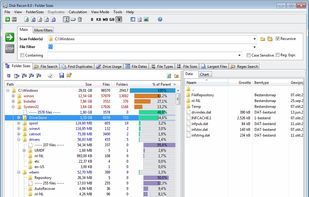
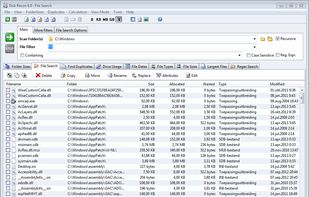
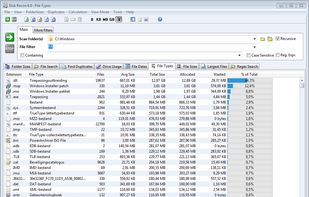
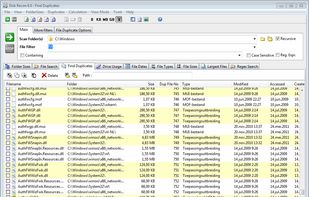
  1. Disk Recon is a disk space utility that reveals all the crucial information that you need to find out where all your disk space has gone and how you can recover it.

    Cost / License

    • Paid
    • Proprietary

    Application type

    Platforms

    • Windows
    • NL flagNetherlands
    • European Union flagEU
    Folder Sizes
    File Finder
    File Types Overview
    +2
    File Duplicates
    65 alternatives
  2. A file manager for Mac that brings your Windows Explorer habits — folder tree, address bar, cut and paste — with nothing taken away from macOS.

    Cost / License

    • Paid
    • Proprietary

    Application type

    Platforms

    • Mac
    Explorer layout on a Mac: folder tree, address bar, command bar
    See where your disk space went
    Light and dark, following your Mac
    8 alternatives
  3. Monitor mounted volumes and manage network targets from the menu bar. Reconnect shares, use profiles, and recover offline targets.

    Cost / License

    • Paid
    • Proprietary

    Application type

    Platforms

    • Mac
    • CH flagSwitzerland
    SRV Status screenshot 1
    SRV Status screenshot 1
    SRV Status screenshot 2
    27 alternatives
  4. Aya icon
     Like

    Aya enables you to quickly and easily analyze which files on your system take up the most space, find duplicates and get rid of them in a familiar Windows style.

    Cost / License

    • Freemium
    • Proprietary

    Application type

    Alerts

    • Discontinued

    Platforms

    • Windows
    Aya screenshot 1
    Aya screenshot 1
    Aya screenshot 2
    +1
    Aya screenshot 3
    14 alternatives
  5. Easy System Utility is a free PC cleaner and Windows optimization tool that helps remove junk files, clear temporary data, and free up disk space. It also includes tools to find large files, unlock files in use, and keep Windows running efficiently on Windows 10 and Windows 11.

    Cost / License

    • Freemium
    • Proprietary

    Application type

    Platforms

    • Windows
    Easy System Utility Clean Tab Analyze
    Easy System Utility Clean Tab
    Easy System Utility Remove Large Folders
    +1
    Easy System Utility Unlock Folders
    17 alternatives
  6. myResources displays the load status of the computer's basic resources (disk, CPU, memory, network) using graphs and active icons. The program is also capable of displaying resources on a merged graphic chart (SumGraph).

    Cost / License

    • Free
    • Proprietary

    Platforms

    • Windows
    • UA flagUkraine
    myResources screenshot 1
    myResources screenshot 1
    myResources screenshot 2
    +14
    myResources screenshot 3
    7 alternatives
  7. FreeUpDisk is a free disk space analyzer and cleanup tool for Windows and Mac. Its core feature is a treemap visualization: a visual map where every file and folder on your drive is represented as a colored rectangle, with size proportional to how much space it occupies.

    Cost / License

    • Free
    • Proprietary

    Application type

    Platforms

    • Windows
    • Mac
    11 alternatives
  8. Monitor the physical condition and temperature of your disks 24/7. Predict remaining service life. See the current percentage of your disk's remaining life. Support for most solid-state drives and hard disks.

    Cost / License

    • Paid
    • Proprietary

    Platforms

    • Windows
    • RU flagRussia
    Kerish Disk Health screenshot 1
    Kerish Disk Health screenshot 1
    Kerish Disk Health screenshot 2
    +6
    Kerish Disk Health screenshot 3
    31 alternatives
  9. A fast, GPU-accelerated disk-usage treemap for Linux. It maps your whole filesystem as nested rectangles sized to what they actually consume, so the space hogs jump out instantly. Then right-click anything for a plain-English “safe to delete?

    Cost / License

    • Free
    • Open Source (MIT)

    Application type

    Platforms

    • Linux
    • Arch Linux
    Storage Sifter screenshot 1
    Storage Sifter screenshot 1
    Storage Sifter screenshot 2
    42 alternatives
  10. File Sumo Pro helps keep your Mac lightweight and running smoothly by finding and deleting those huge files that sit there taking up space.

    Cost / License

    • Free
    • Proprietary

    Application type

    Platforms

    • Mac
    • IN flagIndia
    File Sumo Pro screenshot 1
    File Sumo Pro screenshot 1
    File Sumo Pro screenshot 2
    +2
    File Sumo Pro screenshot 3
    1 alternatives
  11. DiskBrew icon
     Like

    DiskBrew visualizes your disk space so you can see exactly what's taking up storage — including the mysterious "System Data" — and reclaim it safely. DiskBrew is included in every getapps.cafe subscription.

    Cost / License

    • Paid
    • Proprietary

    Application type

    Platforms

    • Mac
    • US flagUnited States
    DiskBrew screenshot 1
    DiskBrew screenshot 1
    DiskBrew screenshot 2
    +1
    DiskBrew screenshot 3
    3 alternatives
  12. O&O DiskStat icon
     1 like

    O&O DiskStat is a high-power tool for analyzing the used disk space on your storage volumes. With an easy-to-use interface based on the design of the Windows Explorer, you can take a closer look at the file and folder structure of your internal and external drives.

    Cost / License

    • Paid
    • Proprietary

    Application type

    Platforms

    • Windows
    • DE flagGermany
    • European Union flagEU
    O&O DiskStat screenshot 1
    57 alternatives
  13. SimplyDiskSweeper is a sandboxed macOS disk-space utility for folders you choose. It ranks accessible files and folders by allocated size in a Finder-like hierarchy. You select what to remove, then confirm before macOS moves those items to Trash.

    Cost / License

    • Paid
    • Proprietary

    Application type

    Platforms

    • Mac
    SimplyDiskSweeper screenshot 1
    SimplyDiskSweeper screenshot 1
    SimplyDiskSweeper screenshot 2
    3 alternatives
  14. For users who like to upload download transfer files frequently, finding whether there are enough space on sdcard or phone is monotonous affair. Using the default Settings app provide that info but this widget app go further.

    Cost / License

    • Freemium
    • Proprietary

    Application type

    Platforms

    • Android
    • Android Tablet
    • SG flagSingapore
    Space Tracker screenshot 1
    Space Tracker screenshot 2
    Space Tracker screenshot 3
    1 alternatives
  15. diskonaut icon
     Like

    diskonaut is a terminal disk space navigator. Given a path on your hard-drive (which could also be the root path, eg. /). diskonaut scans it and indexes its metadata to memory so that you could explore its contents (even while still scanning!).

    Cost / License

    • Free
    • Open Source (MIT)

    Application type

    Platforms

    • Mac
    • Windows
    • Linux
    diskonaut screenshot 1
    diskonaut screenshot 2
    4 alternatives
  16. FreshDisk icon
     Like

    A modern disk space analyzer for Windows that visually maps your storage and uses AI to help you quickly find and clean up unnecessary files.

    Cost / License

    • Freemium
    • Proprietary

    Application type

    Platforms

    • Windows
    • US flagUnited States
    Main screen of FreshDisk visualizing disk space usage
    8 alternatives
  17. StorageRadar maps your disk, shows blocked paths instead of hiding them, lets you dry-run cleanup, and compares what changed over time. Scan data stays local, while analytics and diagnostics remain separately controllable in settings.

    Cost / License

    • Freemium
    • Proprietary

    Application type

    Platforms

    • Mac
    • TH flagThailand
    StorageRader screenshot 1
    StorageRader screenshot 1
    StorageRader screenshot 2
    +3
    StorageRader screenshot 3
    51 alternatives