




Affinity Photo
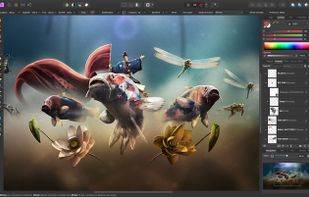
Real-time image editing software supporting extensive colour spaces, unlimited layers, non-destructive edits, and a streamlined workspace for complex tasks on Windows, Mac, and iPad.

Platforms
- Mac
- Windows
- iPad


The app can no longer be downloaded or purchased by new users. Instead, new users should use the new free  Affinity app.

Features
Affinity Photo News & Activities
Recent News
- Maoholguin published news article about Affinity
 Affinity design platform is now a free all-in-one app for photo, vector, and layout design
After a long wait in which Serif removed downloads of its main design apps and made them free on iP...
- POX published news article about Affinity Photo
 Serif makes Affinity iPad apps free amid sudden changes and upcoming major announcement
Serif has unexpectedly made all of its Affinity iPad apps — including Affinity Designer, Affinity P...
- Maoholguin published news article about Affinity Designer
 Serif launches 6-month free trial and 50% discount for Affinity suite to rival Adobe
Serif, the company behind the Affinity creative suite, has introduced a six-month free trial for it...


Recent activities
- jinkah liked Affinity Photo
 kayronnmonteiro added Affinity Photo as alternative to Gifgit
 trentpierce added Affinity Photo as alternative to LingoScreen
 RemovedUser added Affinity Photo as alternative to PhotoGIMP
 crse added Affinity Photo as alternative to PhotoSir
 TheEmperorArt added Affinity Photo as alternative to Affinity
- obiwlankenobi liked Affinity Photo
 hua356463 added Affinity Photo as alternative to Imgsharer
- Maoholguin updated Affinity Photo
- Maoholguin added Affinity Photo as alternative to Affinity


Featured in Lists

There is no doubt that Adobe Suite is great, even in some case it's probably the best. But you can be mad...
For quite a long time, I've been looking into entirely ditching [Adobe Creative...

A list with 49 apps by hercut without a description.


What is Affinity Photo?
Affinity Photo Videos
Affinity Photo information
Developed by
 Serif
Serif Licensing
Proprietary and Commercial product.Pricing
One time purchase (perpetual license) ranging between $20 and $75.Rating
Average rating of 4.7Alternatives
97 alternatives listedNews
10 news article related to Affinity PhotoBadge
Get an embeddable badge for Affinity PhotoSupported Languages


Comments and Reviews
I was looking for a good Photoshop alternative, since I got a new iMac with El Capitan 10.11 and my Photoshop CS4 stopped working. The tools I really need are Healing Brush, Clone, various selection tools, layers & layer masks, a pen tool for creating vector objects, the ability to scale & warp selections - basically, I wanted to get as close as possible to Photoshop's capabilities. When I found Affinity Photo for $30, I was skeptical, but after using it for a while, I'm really happy with it.
As far as I can tell, all the standard Photoshop keyboard commands work - Space for pan, Space-cmd for zoom in, Space-alt for zoom out, J for healing brush, B for brush, P for pen, etc. And you can also add or change any of the keyboard shortcuts through Preferences. There is a good online forum, where they post tutorials & respond to customers (and customers can interact.) The interface is clean, with tools on the left, panels (layers, history, navigator, channels, swatches, styles, etc.) on the right, and on the top are context-sensitive commands that change depending on the tool you are using. There is support for plugins, although I had to go to their support forum to search for instructions on how to get my Photoshop plugins to work.
As far as I can tell, there isn't anything to replace Photoshop actions, which is the biggest downside for me. Otherwise, Affinity Photo has everything I need
[Edited by zeichner42, January 06]
[Edited by zeichner42, January 06]
I want to be an advocate for Affinity. I detest the business Adobe has become. But I regret buying it. It freezes often and before you know it, crashes ungracefully which has lost my work quite a few times. Today, clicking the Brushes tab from the Channels tab is what caused it to crash, which is just pathetic and what drove me to post this review. Bummer.
I bought Affinity Photo after hearing a loop of how the program’s background removing tools were much more precise and refined than Photoshop’s….and after tryng to make the program work on that for over 6 years (I’m stubborn like that), I guarantee you things are the opposite — every time I tried to remove a background using Affinity, I then had to always go to Photoshop to refine the details and finish the work. The UI doesn’t help as it’s overfilled with features that the average user not only will not use but will be overwhelmed by.
I get it. You can do as many comparisons of Adobe Photoshop as you want. But, if you want Photoshop because of the copious amount of video tutorials and AI functionality, then get Photoshop.
That being said, if you want to level up you can't go wrong with Affinity Photo. Some functionality here is done better than Photoshop. Check out PiXimperfect's YouTube video as an example.
For my purposes I don't need to use AI and I don't need an inbuilt video editor to animate images.
Affinity Photo has a very polished interface, and, being similar to Photoshop, is easy to pick up. You can watch many Photoshop videos to get inspiration and apply it here.
What's also handy is the Personas feature where you can easily switch from one design environment to another. To be fair, I haven't used them aside from the Export Persona.
It's no slouch either, where Photo can take advantage of hardware acceleration from your graphics card without taxing the system.
Definitely worth a look at.
I want this to succeed, but it's screwed up color data before when I went to save to a file. Also puts functions behind keyboard shortcuts without listing them in the navigation menus. Super hard to work with.
I find your color data screwup weird, because the color mode is clearly stated when you create a document. Maybe the automatic working profile conversion is the issue. Turn it off and check it if it fixed your issue.
I've worked a lot with Photoshop and find AP to be an improvement in several ways, eg. in brush editing, and just the overall design / feel.
Nice interface, more features than you might expect, and only major updates are paid. There's been one so far, and the first one is still supported. So no subscription and really low price compared to Adobe's.
Both desktop and iPad versions work very well. The iPad app is probably the most advanced touch app I've tried, in having pretty much (exactly?) the same feature set as for desktop (and it's a lot cheaper).
It utilizes the toch screen really well too, balancing desktop adjustment precision standards (unlike eg. Procreate) with intuitive gestures. One of my favorite toch specific features is the radial menu for function keys (cmd, shift, ctrl and option/alt) that work very much like in Adobe applications. That's an update in version 2, in the first one you accessed them with holding 1, 2,3 or 4(??) fingers of your secondary hand on the screen, which worked well, but could be awkward.
Works well with Apple Pencil too, and if your iPad supports hover, you get tooltips and amazing snapping suggestions for relevant tools!
Okay, so buy Affinity Photo if you can, and try Affinity Designer too (like Illustrator), which is also great. Affinity Publisher (like InDesign) seems to be of equal quality.
Just reviewed Affinity Designer so not re-writing that, but this is just as amazing. I think that you cannot go wrong with these products and it is a shame the Affinity range consists only of the three Designer, Photo and Publisher items....however, so far as I am concerned if you do not need the wider suite that Adobe offers or the really specialist features of stuff like GIMP and Inkspace, you should go with Affinity. Check out the YouTube videos from Serif if you want to be convinced!