


Affinity Designer
A precise vector graphic design software built for creative professionals, offering vibrant colors, high-speed performance, live gradients, customizable shapes, and unique non-destructive features for superior design flexibility.
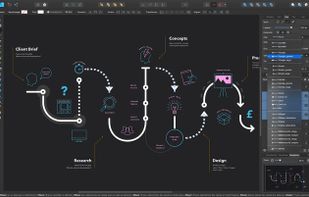

Cost / License
- Pay once
- Proprietary
Application typeApplication types
Alerts
- Discontinued
Platforms
- Mac
- Windows
- iPad


The app can no longer be downloaded or purchased by new users. Instead, new users should use the new free  Affinity app.

Features
Affinity Designer News & Activities
Recent News
- Maoholguin published news article about Affinity
 Affinity design platform is now a free all-in-one app for photo, vector, and layout design
After a long wait in which Serif removed downloads of its main design apps and made them free on iP...
- POX published news article about Affinity Photo
 Serif makes Affinity iPad apps free amid sudden changes and upcoming major announcement
Serif has unexpectedly made all of its Affinity iPad apps — including Affinity Designer, Affinity P...
- Maoholguin published news article about Affinity Designer
 Serif launches 6-month free trial and 50% discount for Affinity suite to rival Adobe
Serif, the company behind the Affinity creative suite, has introduced a six-month free trial for it...


Recent activities
- jinkah liked Affinity Designer
- DaChonker liked Affinity Designer
- leahxgonz liked Affinity Designer
- mopetersondesign liked Affinity Designer
 kayronnmonteiro added Affinity Designer as alternative to Gifgit
- mkdot7 liked Affinity Designer
 Grimstache added Affinity Designer as alternative to Sacred Geometry Maker
 trentpierce added Affinity Designer as alternative to LingoScreen
 zixzeus added Affinity Designer as alternative to JigsawDesigner


Featured in Lists

There is no doubt that Adobe Suite is great, even in some case it's probably the best. But you can be mad...
For quite a long time, I've been looking into entirely ditching [Adobe Creative...

A list with 49 apps by hercut without a description.


What is Affinity Designer?
Affinity Designer Videos
Affinity Designer information
Developed by
 Serif
Serif Licensing
Proprietary and Commercial product.Pricing
One time purchase (perpetual license) ranging between $20 and $75.Rating
Average rating of 4.4Alternatives
62 alternatives listedNews
9 news article related to Affinity DesignerBadge
Get an embeddable badge for Affinity DesignerSupported Languages


Comments and Reviews
I've used adobe CS6 suite for the longest time, needed a new replacement program for handling vector files and doing light editing that I would normally do in paint.net. Mostly for creating simple graphics as well for webdesign.
I wanted something similar to Apple's Sketch since windows unfortunately didn't have any close equivalents. This is the closest thing to it
I would describe Affinity Designer as a mix of Apple Sketch and Illustrator, with Photoshop (Raster image tools) baked in. There's also a seperate program specifically for working with photos, that's called affinityphotos
PROS:
The problem with using illustrator is I didn't use it everyday, so sometimes I would forget all these quirky workflows when working with it, and it'd take far too long to get something done.
I was able to create simple graphics without looking at tutorials, its very intuitive.
Good alternative to Adobe - no subscription required.
Affordable one off purchase, absolutely one of my favourite work apps. I haven't used Adobe in years.
10+ stars. The Affinity suite, with Designer, is affordable with no outrageously overpriced subscriptions, well maintained, packed with features, and easy to use. Affinity seems to really care about their users. The programs are updated regularly, the price is very fair, and did I mention how much less resources it requires to run??
If you're coming from Adobe, or if you are new to graphic design, there is a learning curve. Some things are different, but there are tons of resources available either through Affinity themselves or the passionate Affinity community to help you get up to speed.
It's much faster than adobe, less buggy (and I'm using the beta versions!), you can import or open just about anything, and adobe files are easy to open and edit with all the layers intact, etc. You can export to almost anything as well. The programs are all integretated so nicely.
I had adobe photoshop, but could never afford to get illustrator which I also needed, so I tried Designer quite awhile ago. I love it and will never go back, even though I used Photoshop since version 2.5 back in the early 90s.
You get everything you need to create stunning designs, and vibrant art!
I just wanted to add and it's about what others have said that Affinity Designer lacks of basic editing tools and can't be used on any projects. I totally disagreed! If you say basic tools for editing I am just wondering what kind of basic tool you meant? Just imagine what Illustrator can do, Affinity Designer can do it too and it even surpasses the Illustrator especially in performance. Maybe when you try to use Affinity Designer it's not that deep or maybe there are times when you don't get what you want to do in Affinity Designer and you give up. Affinity Designer is actually very easy to use as easy compared to that of Illustrator. As for an example, a basic editing for an element like "Clipping Path" that was used also in Illustrator. This basic editing into an element like clipping path is you can do this also in Affinity Designer in just two or three steps. If you have an image in your layer just add any shape do you like, for example a star tool shaped and positioned that shape on top of the image on the layer. Now the image that was below of the star tool shape just simply click and drag to the bottom layer onto the top layer. And you will see the result in just a few steps. We come to another basic of editing tools like the multiple pages. In illustrator when you edit multiple pages it will inevitably lag, especially if there are many pages. In Affinity Designer the multiple pages in artboards mode, it works like a charm. It's like you're only working on a single page, it's not slowing down, even if you are dragging it right and left using with the hand tool it does not change. If you're just looking for basic editing tools, you'll find them all on the left side of the toolbar in the Affinity Designer workspace.
You buy it once, you own it forever. The software goes on sale often too! I've used it for all kinds of graphic design work for years and love how intuitive it is. I'm happy with my purchase.