


espanso
An open source, cross-platform text expander written in Rust.

Cost / License
- Free
- Open Source (GPL-3.0)
Application type
 EU
EUPlatforms
- Mac
- Windows
- Linux


Features
espanso News & Activities
Recent News
Recent activities
- boncuk10 liked espanso
- bearygarcia liked espanso
 g79t8c6w94 added espanso as alternative to Canned Replies
It’s not particularly user-friendly when it comes to adding new items. This is done via a .yml script, where you need to take care to use exactly the same format as in the examples (including the tab spaces). But apart from that, it’s the best ‘text expander’, compatible with both Linux and Windows, and for the script, simply copying and pasting ensures you don’t break it.
 snippetcraft added espanso as alternative to SnippetCraft



Featured in Lists

This is the apps for Windows 11 that I would recommend to anyone who just got a PC ! The same list...

## THIS LIST HAS BEEN DELETED DUE TO A BUG, SO IT MISSES SOME HONORABLE MENTIONS ! I've been using Linux for a...

## THIS LIST HAS BEEN DELETED DUE TO A BUG, SO IT MISSES SOME HONORABLE MENTIONS ! This is the apps for macOS that I...
What is espanso?
espanso information
Developed by
 Federico Terzi
 Licensing
Open Source (GPL-3.0) and Free product.Written in
Rating
Average rating of 4.6Alternatives
63 alternatives listedBadge
Get an embeddable badge for espansoSupported Languages

AlternativeTo Categories
Development, Office & ProductivityGitHub repository
- 14,504 Stars
- 467 Forks
- 538 Open Issues
- Updated



Comments and Reviews
Fast and reliable, easy to configure, and with text-based configuration files that you can easily share between computers and keep in source control.
Definitely not for averages users, cause it is not intuitive and in my modest opinion it is crude and cumbersome.
Well, it is an effort to move to open-source. Open-source is mostly by sensible people for helping sensible people. Proprietary is usually by smart people to stupefy people.
It’s not particularly user-friendly when it comes to adding new items. This is done via a .yml script, where you need to take care to use exactly the same format as in the examples (including the tab spaces). But apart from that, it’s the best ‘text expander’, compatible with both Linux and Windows, and for the script, simply copying and pasting ensures you don’t break it.
IF you install the espanso-gui alongside it, it's quite straightforward to use and run even for beginners. The GUI also makes it apparent that one can simply edit the .yml files in %Appdata%\Roaming\espanso\match to very easily add text strings.
The only thing that's going to block beginners is that the Windows pre-compiled binary is only available if they download the previous version 23.10 -- if they grab the latest version 24.7 from github, it's just going to be a bunch of source code and build/makefiles. It would make more sense to include the simple GUI in the espanso default installer, perhaps as a toggle-able option.
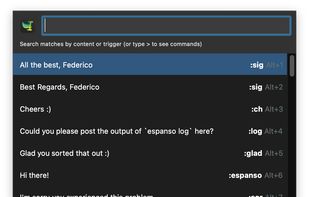
Beginners are more likely to have a much easier time with the program PepperText. There is a case when you will want to use Espanso though. For instance, the making of long list of items, especially emoji. Note that Espanso has no user interface until you add one. The way to start, is to also install this: espansoGUI Espanso and PepperText handle multiple choice, but not all expander programs do. set two entries to the same keyword. If you want to set a long list of just text to shortcuts, I suggest the program TyperTask because you can put them in the text file vs messing with yaml. Note that Espanso opens a search/launch bar when a trigger word is typed, and that might "hijack" programs like Listary if a trigger word is typed. PepperText doesn't have that issue because it pops up text vs a toolbar. On the plus, the toolbar method gives you a choice to prevent an auto-typing if you don't want it at the moment.
My favourite text expander.
Can substitute dynamically for dates, etc.
Also acts as a script trigger.
Linux standard install is CLI and lightweight. GUI available for techno-grannies.
.ymlbased cofiguration, extremely easy to learn. No coding experience required.It's very simple, easy to use, and you gotta love that it's free and open source. Excellent time saver!