

FindInside icon
FindInside icon

FindInside

An utility that searches for text inside documents and files, including PDFs, Office files, logs, source code, and many other formats.
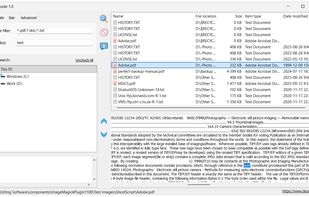
FindInside screenshot 1

Cost / License

  • Free
  • Proprietary

Platforms

  • Windows
0likes
0comments
0alternatives
0articles

Features

  1.  Full-Text Search

FindInside News & Activities

Highlights All activities

Recent activities

FindInside information

  • Developed by

    CY flagTkoSoft
  • Licensing

    Proprietary and Free product.
  • Alternatives

    0 alternatives listed
  • Supported Languages

    • English
FindInside was added to AlternativeTo by tkosoft on and this page was last updated .
No comments or reviews, maybe you want to be first?

What is FindInside?

FindInside is a file content search program for users who need to find text stored inside documents and folders. It is designed to search through many document types, including PDF files, Word documents, spreadsheets, presentations, plain text files, logs, source code, configuration files, and other formats commonly found on a Windows PC.

The main purpose of FindInside is to help users locate a file when they remember a word, phrase, number, error message, customer name, project title, or other text inside the document, but do not know the exact file name. Search results are displayed in a file list, and the selected result can be viewed directly inside the program as extracted text. The matching phrase is shown in context, which makes it easy to confirm whether the file is the correct one before opening it externally.

The application includes recursive folder search, wildcard file masks, optional hidden-file search, file size filtering, and date filters based on file access, creation, or modification dates. It is a lightweight tool for everyday document search, office work, technical support, software development, and anyone who works with large sets of mixed file types.

