Gradia AlternativesScreenshot Capture Tools and other similar apps like Gradia

Gradia is described as 'Make your screenshots ready for the world. Gradia allows you to quickly modify screenshots of application windows to put them better in context' and is a screenshot capture tool in the photos & graphics category. There are more than 10 alternatives to Gradia for a variety of platforms, including Mac, Web-based, Windows, Linux and Snapcraft apps. The best Gradia alternative is Flameshot, which is both free and Open Source. Other great apps like Gradia are Ksnip, macshot, SimplShot and MakeShot Pro.

Copy a direct link to this comment to your clipboard
Alternatives
Get a badge for your siteGradia alternatives page was last updated

Alternatives list

  1. Flameshot icon
     274 likes

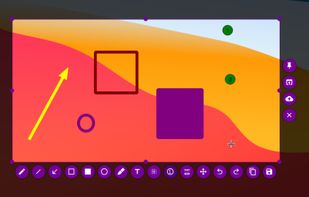
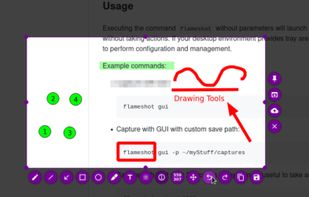
    Flameshot is a free, open-source screenshot tool that is cross-platform compatible, offering customization, editing features, CLI scripting, and direct Imgur uploads for seamless sharing. It provides an intuitive user experience through features like area selection, annotations, and saving options.

    106 Flameshot alternatives

    Cost / License

    Application type

    Platforms

    • Mac
    • Windows
    • Linux
    • Flathub
    • Snapcraft
    Good alternative?
     
  2. Ksnip icon
     68 likes

    Ksnip is a Qt based cross-platform screenshot tool that provides many annotation features for your screenshots.

    80 Ksnip alternatives

    Cost / License

    Application type

    Platforms

    • Mac
    • Windows
    • Linux
    • Snapcraft
    • Flathub
    Good alternative?
     
  3. macshot icon
     16 likes

    Feature-packed native macOS screenshot tool — annotate, auto-redact PII, record GIFs, OCR + translate, scroll capture, beautify, and more. No Electron, no subscription.

    Cost / License

    Application type

    Platforms

    • Mac
    • Homebrew
    Good alternative?
     
  4. SimplShot icon
     11 likes

    Lightweight screenshot application for macOS featuring distraction-free interface, fast image capture, clear annotation tools, simple export workflow, and no subscriptions or complex menus, focusing on quick sharing and a one-purpose design for everyday use.

    Cost / License

    • Free
    • Open Source (MIT)

    Application type

    Platforms

    • Mac
    Good alternative?
     
  5. MakeShot Pro icon
     11 likes

    Instantly edit screenshots online with MakeShot Pro. Upload your screenshot. Add a background, text, rounded corners, or emojis. Download or share on social media. Simple, fast, and free!.

    Cost / License

    • Free
    • Proprietary

    Application type

    Platforms

    • Online
    Good alternative?
     
  6. Web-based tool for turning any web page capture into a customizable screenshot mockup with browser or mobile frames, diverse styles, colors, and backgrounds, exportable as PNG, JPG, or SVG, minimal permissions, open source, ad-free, and suited for branding needs.

    Cost / License

    • Free
    • Open Source (MIT)

    Application type

    Platforms

    • Online
    • Microsoft Edge
    • Google Chrome
    • Mozilla Firefox
    Good alternative?
     
  7. Pixsnip icon
     7 likes

    Privacy-focused screenshot utility with local-only storage, capture and post-editing, precision tools like rulers and color picker, grouping, collage and card creation, full history, an intuitive interface, and no cloud or login required for secure offline workflows.

    Cost / License

    • Free
    • Proprietary

    Application type

    Platforms

    • Mac
    • Windows
    Good alternative?
     
  8. Capty icon
     4 likes

    Capture your screen, windows, or regions on macOS, record with audio, edit screenshots and videos using built-in tools like shapes, blur, and redaction, export in various formats with multiple quality presets, enjoy ad-free usage, offline access, and no registration.

    Cost / License

    • Paid
    • Proprietary

    Application type

    Platforms

    • Mac
    Good alternative?
     
  9. Curate Draw icon
     5 likes

    Annotate screenshots on macOS with drawing tools, brushes, shapes, text, and pointer emojis. All processing is local for privacy. Preview and export in JPEG, PNG, or WebP, downscale high-res images, set export paths, and enjoy a small, responsive app.

    Cost / License

    • Free
    • Proprietary

    Application type

    Platforms

    • Mac
    Good alternative?
     
  10. Screencut icon
     3 likes

    Screencut is useful app for iPhone for creating amazing image for a viral posts. Easily create screenshots in a powerful editor that supports photos and videos, adding notes, overlaying text and GIF animations, and flexible settings for shadows and fillets.

    Cost / License

    • Freemium
    • Proprietary

    Application type

    Platforms

    • iPhone
    Good alternative?
     
12 of 20 Gradia alternatives