




Curate Draw
5 likes
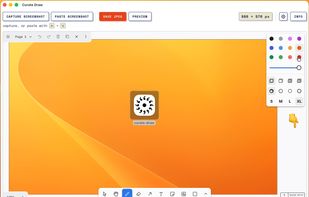
Annotate screenshots on macOS with drawing tools, brushes, shapes, text, and pointer emojis. All processing is local for privacy. Preview and export in JPEG, PNG, or WebP, downscale high-res images, set export paths, and enjoy a small, responsive app.

Cost / License
- Free
- Proprietary
Application type
 EU
EUPlatforms
- Mac

Features
Curate Draw News & Activities
Highlights All activities
Recent activities
 Mysdes added Curate Draw as alternative to Frset
 POX added Curate Draw as alternative to OpenScreenShot
- Mkreborns liked Curate Draw
- Sublimeartsio liked Curate Draw
- e-braun liked Curate Draw
- 27himanshuk liked Curate Draw
- blinkurls liked Curate Draw
 Maoholguin added Curate Draw as alternative to CleanShot X, ShotLab, Shottr and Capcha Screenshot
- Maoholguin updated Curate Draw
- Danilo_Venom updated Curate Draw


Curate Draw information
Developed by
 Jan-Hendrik Müller
 Licensing
Proprietary and Free product.Alternatives
23 alternatives listedBadge
Get an embeddable badge for Curate DrawSupported Languages


No comments or reviews, maybe you want to be first?