




HWMonitor
117 likes
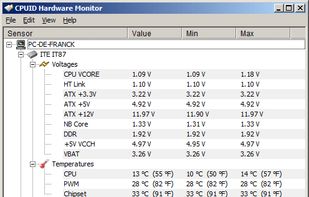
HWMonitor for Windows® x86/x64 is a hardware monitoring program that reads PC system's main health sensors : voltages, temperatures, powers, currents, fans speed, utilization, clock speeds…

Cost / License
- Freemium (Pay once)
- Proprietary
Application type
 EU
EUPlatforms
- Windows

Features
HWMonitor News & Activities
Highlights All activities
Recent News
- Maoholguin published news article about HWMonitor
 HWMonitor & CPU-Z users were exposed to malware through fake downloads after CPUID breach
CPUID, the developer behind the popular tools HWMonitor and CPU-Z has been hit for a website breach...

Recent activities
 elharakimm added HWMonitor as alternative to PGA System Monitor
 Obscrum added HWMonitor as alternative to PC HW Monitor
- TBayAreaPat replied to a comment / review on HWMonitor
 Fla added HWMonitor as alternative to Tray Monitor
 chililikobo added HWMonitor as alternative to Ohnuki-san Lite
- chililikobo added HWMonitor as alternative to Ohnuki-san Lite


Featured in Lists

A list of everything I used and I find cool / usefull, also trying to search for the best software
List by OzakI with 62 apps, updated

Clean, small, use! For activation use: [https://massgrave.dev/](https://massgrave.dev/) or...
List by littlebighorse with 53 apps, updated

A must have software collection free of charge, lightweight & portable
List by Alternus with 12 apps, updated
What is HWMonitor?
HWMonitor information
Developed by
 CPUID
CPUID Licensing
Proprietary and Freemium product.Pricing
One time purchase (perpetual license) ranging between $20 and $35 + free version with limited functionality.Rating
Average rating of 2.2Alternatives
44 alternatives listedBadge
Get an embeddable badge for HWMonitorSupported Languages


Comments and Reviews
It seems to share the same base code as Open Hadware Monitor, but i.m.o. has a disadvantage: temperatures are shown in both °C and °F, thus resulting in a somewhat confusing screen. That's useless, because °F is used solely in the US - it would be better if one could choose just one to display.
It's good but it could save the view that user config. When you open it's expand every device every time.
Obviously it's a fork of the free and open source app "Open Hardware Monitor". Pure copycat software with no additional features of its own (too lazy to make even a superficial cosmetic face lift of the interface). Yet it charges people money. Not sure such a thing should be listed at alternatieto as it only adds confusion.
from AI: More frequent official releases for new hardware support. Makes some tree vs simple list views. from Alternternative: OHM seems to be abandoned, though there are newer forks.
Con: Only Pro version can display desired data in systray icon. Requires admin privileges to read CPU temperature.