


LibreOffice - Draw
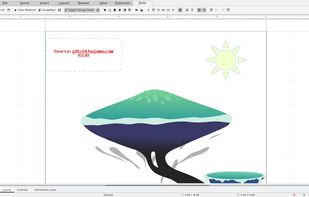
Draw lets you produce anything from a quick sketch to a complex plan, and gives you the means to communicate with graphics and diagrams. With a maximum page size of 300cm by 300cm, Draw is a an excellent package for producing technical drawings, general posters, and much else.

Cost / License
- Free
- Open Source (MPL-2.0)
Application typeApplication types
 EU
EUPlatforms
- Mac
- Windows
- Linux
- BSD
- PortableApps.com
- Flathub


Features

LibreOffice - Draw News & Activities
Recent News
- POX published news article about LibreOffice
 LibreOffice 26.8 released with new paragraph composer & variable font support; still no AI
The Document Foundation has officially released LibreOffice 26.8, marking the latest major iteratio...
- POX published news article about LibreOffice
 LibreOffice 26.2 adds Markdown import/export, better Excel compatibility, and speed boost
LibreOffice 26.2 delivers a wide range of updates focused on interoperability and usability. Markdo...
- Maoholguin published news article about LibreOffice
 LibreOffice 25.8 launches with PDF 2.0 export, AES-256 encryption and PDF/A-4 support
LibreOffice 25.8 has been launched with notable cross-platform performance improvements, including ...


Recent activities
 romyr1717 added LibreOffice - Draw as alternative to Excalidrawz
 saransh121 added LibreOffice - Draw as alternative to flowChart
- POX added LibreOffice - Draw as alternative to Flostep
- bulldogs liked LibreOffice - Draw
- Robin_P liked LibreOffice - Draw
- heheudueueh liked LibreOffice - Draw
- gianni-bram liked LibreOffice - Draw
- diagnoses1824 liked LibreOffice - Draw
- AlternativeOfTheUsername liked LibreOffice - Draw
- mqdlou liked LibreOffice - Draw


Featured in Lists

Ever wondering about free great open source software to start your idea? Here's a list for you to get...
How are you? In this list I bring you a variety of alternative software to those from Microsoft, and also that these...

A list with 568 apps by AmileyaRyver without a description.


What is LibreOffice - Draw?
LibreOffice - Draw Videos
LibreOffice - Draw information
Developed by
 The Document Foundation
 Licensing
Open Source (MPL-2.0) and Free product.Rating
Average rating of 4.5Alternatives
106 alternatives listedNews
7 news article related to LibreOffice - DrawBadge
Get an embeddable badge for LibreOffice - DrawSupported Languages


Comments and Reviews
Cross-platform, multi-language, free and open source. What I like the most, is the ability of editing some PDF files (not all - some issues applies). Is fast and intuitive, the tools are pretty much the same compared to the rest of LibreOffice Suit applications (writer, calc, impress, etc) or very easy to understand. Another interesting tool is magnetic connectors with help when you're creating flowcharts.
Incredibly powerful PDF editor, PDF image and text modifier. The rendering engine is lacking though.
I used LibreOffice Draw for PDF redaction. It appears to completely redact the information irretrievably. This is the only free, open-source desktop option that I'm aware of. 4-stars only because I'm otherwise unfamiliar with the program.
Not many people know that it is also good as a simple PDF editor. And it is a free/libre software.
This piece of software came in handy when I needed to convert an SVG file to raster ones like JPEGs, GIFs and PNGs. There must be many other ways to do the job, but for those of us, including myself, who are not very familiar with handling various types of image files, LibreOffice Draw may be one of the easiest.
I added LibreOffice Draw as an alternative to non-free software to create comics even though it's not a dedicated product to do so, because it includes tools to create speech/though bubbles very easy as well as frames and most basic comic-creation elements.