


LosslessCut
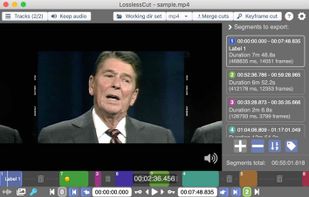
Simple, cross platform video editor for lossless trimming / cutting of videos. Great for rough processing of large video files taken from a video camera, GoPro, drone, etc. Lets you quickly extract the good parts from your videos and discard GB of data without losing quality.

Cost / License
- Free
- Open Source (GPL-2.0)
Application type
Platforms
- Mac
- Windows
- Linux


Features
LosslessCut News & Activities
Recent News
Recent activities
Lossless Cut is my new favorite FOSS lightweight video editor for at least 4 reasons. 1.Fast view Speed using hotkeys J & L 2.Fast-Copy method- most video editors will make you encode which is a lot slower 3.It retains timestamps.. most don't 4.The Kanban style segment listing is easy, visually pleasant, and offers a lot of flexibility I'm basically do intermittent cropping. On the right hand side, I choose merge cuts at the top, and use the split segment symbol at the bottom ][. Split...
- TBayAreaPat liked LosslessCut
- TBayAreaPat replied to a comment / review on LosslessCut
- bnchndlr liked LosslessCut
 pjmdesign added LosslessCut as alternative to Stream Manager
- 4thy liked LosslessCut
- mIKEtHEn00B liked LosslessCut
- ditex39772 replied to a comment / review on LosslessCut
- Just4Me updated LosslessCut
- POX replied to a comment / review on LosslessCut


Featured in Lists

A collection of applications I have found myself taking great advantage of in my various endeavors when built-in...

Mostly free Video Player, Editor, Splitter, Converter, Video Capture, Screen Capture, Video Downloader software, Codec...

What a adobe creative cloud FOSS alternative(including Discontinued Apps and linux)? Well there is not a full suite...


What is LosslessCut?
LosslessCut Videos
LosslessCut information
Developed by
 Mikael Finstad
 Licensing
Open Source (GPL-2.0) and Free product.Written in
Rating
Average rating of 4.8Alternatives
20 alternatives listedBadge
Get an embeddable badge for LosslessCutSupported Languages

AlternativeTo Categories
Photos & Graphics, Video & Movies, Audio & Music, DevelopmentGitHub repository
- 43,862 Stars
- 2,174 Forks
- 306 Open Issues
- Updated


Comments and Reviews
Fácil, solo requiero cortar, no me quiero complicar con efectos o nombres de archivos, este programa lo hace simple :)
Interface is good, seems fast, but it messed up creating output. I asked for 3 clips to be output to single file and what I got was clip1 then clip 1 plus the bit between clip1 and 2 then clip 1 again, then ... I gave up and closed the output. Retraced my steps to make sure I wasn't at fault. Time is precious.
Lossless Cut is my new favorite FOSS lightweight video editor for at least 4 reasons. 1.Fast view Speed using hotkeys J & L 2.Fast-Copy method- most video editors will make you encode which is a lot slower 3.It retains timestamps.. most don't 4.The Kanban style segment listing is easy, visually pleasant, and offers a lot of flexibility I'm basically do intermittent cropping. On the right hand side, I choose merge cuts at the top, and use the split segment symbol at the bottom ][. Split while viewing paused or not, delete unwanted segments Kanban style, Export, done. :) While you can rotate the view on a temporary basis, there is conflicting info about LosslessCut being able to do fast-copy style exported rotating. It didn't work for me, and I recommend using Free Video Rotator afterwards for permanent rotating as needed.
Not free for Windows or Mac.
You can download it for free from GitHub.
Download without Microsoft Store: https://github.com/mifi/lossless-cut/releases/tag/v3.69.0
It's a simple cut video without recode. Just what I needed.
Free, open source, does the job merging and splitting video files, and automagically updated through the app stores (if you're willing to support)
It's good because it shows the key frames(the I frames) visually in the horizontal bar. I can find easily where the I frames are. Because it's a native Linux app, I don't need to emulate and it's very fast. Moreover it's FOSS.