


Q-Dir
201 likes
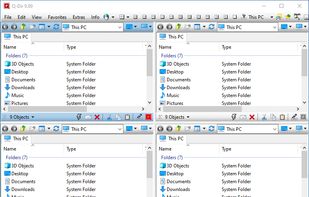
Q-Dir makes your files and folder easy to manage. Fast and easy access, with an amazing Quadro-View (4 panes) technique. You dont have to renounce the usual, Drag and Drop, all Views, and other functions of your system. No!

Cost / License
- Free
- Proprietary
Application type
 EU
EUPlatforms
- Windows
- PortableApps.com


Features
Q-Dir News & Activities
Highlights All activities
Recent News
No news, maybe you know any news worth sharing?
Share a News TipRecent activities
 Maik-Hofmann added Q-Dir as alternative to Peach Commander
 NuneX added Q-Dir as alternative to ExplorerFocus
The one program that I wish It is exist on Linux, too.
- darkinsun liked Q-Dir
 kodar_ninja added Q-Dir as alternative to TheFile.Ninja
- RemovedUser updated Q-Dir
 POX added Q-Dir as alternative to Captain's Deck


Featured in Lists

A list with 328 apps by christineconnor without a description.
List by christineconnor with 328 apps, updated

Priorities - Functionality - Minimal RAM power - customizable - accesible - plugins - good UI design - skins and...
List by kaekazeh with 24 apps, updated

A list with 61 apps by julienth37 without a description.
List by Julien Beauvais with 61 apps, updated
What is Q-Dir?
Q-Dir information
Developed by
 SoftwareOK (Nenad Hrg)
 Licensing
Proprietary and Free product.Rating
Average rating of 4.4Alternatives
104 alternatives listedBadge
Get an embeddable badge for Q-DirSupported Languages


Comments and Reviews
i have tried all the options in alternativeto and THIS ONE is the best file manager.
the only thing I could ask for would be an integration with QuickLook, even though it has already a preview.
The one program that I wish It is exist on Linux, too.
This is what I want in a file explorer. Being lightweight and fast. It is kind of buggy, especially if you mess with the colors. The UI is not very customizable and kind of ugly as well. I wish the buttons were more customizable as well.
The reason for 3 stars, rather than 4, is that it is not open-source. Even with it firewalled, because I cannot inspect the source, there is the possibility of it modifying files or opening my system up to security exploits.
Great program and definitely recommended. But beware that Q-Dir can't handle symbolic linked folders correctly. It will jump to the source folder instead of the symlinked location. I contacted the developer but he gave me vague uninterested answers. I guess he just won't fix the issue. That's a shame for a file manager.
What's Great is that you can save a layout of multiple folders that you want to refer to for a task. Finding Quick View is tricky. Go to Extras, Click Tree View, and click either one of the first two options. They recommend an option way down to expand the system favorites.. you might like that better. A search bar would be nice.
I would give 5 stars because this has been my main file management software for a couple years but it does not play nice with Google Drive streaming and when it freezes a hard start is required. If you use Google Drive or the sync variant be cautious, otherwise this would be my top pick.
Awesome app, never crashed never shaky or buggy add search bar and it'll be unicorn