


Resilio Sync
329 likes
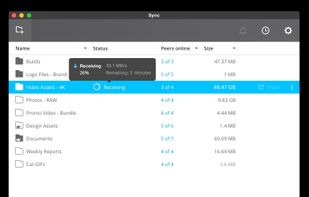
Resilio Sync allows you to automatically sync files between computers via secure, distributed technology (P2P bittorrent protocol).

Cost / License
- Free
- Proprietary
Application typeApplication types
Platforms
- Mac
- Windows
- Linux
- Android
- iPhone
- Android Tablet
- BSD
- Windows Phone
- iPad
- Kindle Fire


Features
Resilio Sync News & Activities
Highlights All activities
Recent News
No news, maybe you know any news worth sharing?
Share a News TipRecent activities
 marius-cristian added Resilio Sync as alternative to KeibiDrop
- Usnyn liked Resilio Sync
 joshpigford added Resilio Sync as alternative to Granite
 martnl added Resilio Sync as alternative to FilesToNAS
 swat777 added Resilio Sync as alternative to HearthWire
- brokesimp69 liked Resilio Sync
 joshuabrush21 added Resilio Sync as alternative to LACloud (Local Area Cloud)
 astorstack added Resilio Sync as alternative to Complibase
 c17s5qhu added Resilio Sync as alternative to chibisafe
 Nikola-RSW added Resilio Sync as alternative to Privatta


Featured in Lists

Master List of all Apps and Software I use for both work and personal life.
List by Jimmy Briggs with 416 apps, updated

Just a list of some of the apps I use at home
List by rabbit5 with 48 apps, updated

A list with 568 apps by AmileyaRyver without a description.
List by AmileyaRyver with 568 apps, updated


What is Resilio Sync ?
Resilio Sync information
Developed by
 Resilio, Inc.
 Licensing
Proprietary and Free product.Pricing
One time purchase (perpetual license).Rating
Average rating of 3.2Alternatives
82 alternatives listedBadge
Get an embeddable badge for Resilio SyncSupported Languages
AlternativeTo Categories
Backup & Sync, File SharingApple AppStore
- Updated
- 4.53 avg rating


Comments and Reviews
I used BTSync for over a year then finally bought the Resilio Sync Pro. I use it for all my files now, either syncing work, photos or game folders. Once you figure out how to use it properly, it is far superior. I have mine set up to sync my Google Drive, SpiderOak, Dropbox, Box, Sync & ownCloud to once place in one master folder. The syncing/speed is always wicked fast locally & will only seem slow if you have a limited AKA 'cheap' broadband connection you will have no issues.
For those who care, yes your computers talk to the AmazonAWS server cluster, that is how you access your node internationally.
When trying to sync my work machine with my backup on my NAS, the first thing it did was overwrite all my local changes with the old code.
Pretty much the exact opposite of what it is supposed to do. And the only way to find out how to restore it, is to manually compare every single file from it's hidden archive folder with the current version in the file system, because it's history is just a long list of transfers. No per-file history information or anything.
Furthermore, the Synology DSM client does not work correctly in Firefox, and keeps asking for username and password, immediately after filling them in.
https://www.resilio.com/sync/](https://www.resilio.com/sync/ Requires registration and to apply for a free license. As a novice, I am starting with SyncBack.
Resilio Sync has a few advantages over Syncthing: On Android it can modify the SD card, so you can have two-way sync, and I has selective sync where you can choose individual folders or files using a GUI and leave the rest on the "server". Unfortunately it is not as good at dealing with conflicts, etc. and can screw up timestamps of files, re-create files immediately after you deleted them, etc.
Resilio is one of the best tools I have ever seen in this field backing up to NAS but also I tried Gs Richcopy 360, the tool is simple, fast, and affordable. but totally both are very similar.
Just Reviewed to post THIS https://www.dropbox.com/sh/cpcjsw9pvp1d5wz/AABPe8E9stDVw9vSsvtCg9sta?dl=0 (not mine) will mirror if needed .. You get v1.4.111 - linux/windows/osx + 1.4.65.0 android .. Have FUN!
Hazzah, you rock!
This is the perfect solution for backing up your mobile pictures and videos to your own server, file share, or NAS. In addition to "sync" functionality, it also works in backup mode, with a true one-way transfer.
In Syncthing, if you delete a picture on your phone, it deletes on your server/NAS/whatever too. Based on the GitHub issues I've read, the Syncthing developers are EXTREMELY resistant to adding any functionality that isn't specifically remote sync (e.g. keep this folder identical to this remote folder).