


Syncthing
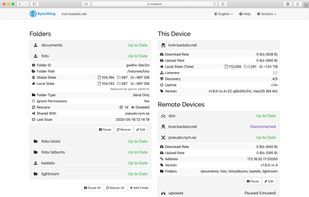
Open-source, peer-to-peer service offering encrypted file synchronization, ensuring data privacy and user-autonomy without relying on cloud storage or central servers, suitable for various uses.

Cost / License
- Free
- Open Source (MPL-2.0)
Application type
 EU
EUPlatforms
- Mac
- Windows
- Linux
- BSD
- Self-Hosted
- Terminal
- Cloudron
- Termux

Features
Syncthing News & Activities
Recent News
- Fla published news article about Syncthing
 Syncthing 2.1 adds group organization and proxy support options
Syncthing 2.1 introduces the ability to group devices and folders in the GUI using a new group attr...
- POX published news article about Syncthing
 Syncthing 2.0 debuts with SQLite migration, new logs, platform changes, and much more
Syncthing 2.0 has arrived, marking a major release for the popular open source solution for continu...
- POX published news article about Syncthing
 The Syncthing Android app is being discontinued, but alternatives remain available
Simon Frei, the maintainer of Syncthing, has announced the retirement of the official Syncthing And...


Recent activities
- Shadow5964 liked Syncthing
- magicscraper liked Syncthing
- TEAMPLAYER liked Syncthing
 martnl added Syncthing as alternative to FilesToNAS
- Kirihi147 rated Syncthing
- Kirihi147 liked Syncthing
 swat777 added Syncthing as alternative to HearthWire


Featured in Lists

## WHAT IS F-DROID ? F-Droid is an awesome app repository for FOSS (Free & Open Source Software) android apps....

A list of interesting and open source [Android](/software/android/) apps.

Privacy-enhancing software I trust / recommend. Browsers and their extensions, email providers, VPN services,...
What is Syncthing?
Syncthing Videos
Syncthing information
Developed by
 Jakob Borg
 Licensing
Open Source (MPL-2.0) and Free product.Written in
Rating
Average rating of 4.2Alternatives
138 alternatives listedNews
3 news article related to SyncthingBadge
Get an embeddable badge for SyncthingSupported Languages

AlternativeTo Categories
Backup & Sync, File Sharing, Security & Privacy, OS & UtilitiesGitHub repository
- 88,610 Stars
- 5,472 Forks
- 382 Open Issues
- Updated


Comments and Reviews
SyncTrayzor will encapsulate SyncThing within a regular program window. Can be closed and/or minimized to tray and start-up minimized as well. You can still access the web interface if desired. The SyncThing executable keeps a (ugly) taskbar slot constantly open, SyncTrayzor fixes this. Get it here, https://github.com/canton7/SyncTrayzor Also, I would like to add that it works just fine on Windows 10 x64 (TP-10130) without a hitch.
I sought out an alternative to Bitorrent Sync and SyncThing+SyncTrayzor takes care of my needs.
Thank you for mentioning this utility! My biggest issue with SyncThing was having to keep a terminal window open all the time.
If you are using Linux (terminal?) you can run it with "screen syncthing". Then just press Ctrl + AD and you have it in the background. Get screen by inserting "sudo apt-get install screen" if you are running debian-based distros like me.
Nowadays on Linux, you can install Syncthingy, it's just awesome - it's a simple install from Flathub (any distro), it will start and run in the background for you and there are no supplementary overly complicated UI, you can just open and use the web client
Why it makes so difficult to implement your own private server, why the code DOES NOT allow private relay server to use only by you and colegues/family ?? You are obligated to use external not know relay servers and A global server and NOT your own domain name/server for use? Why it doesn't let you use your own PGP public/private keys? A little strange to say the least! With this security flaws I prefer to use my own SFTP with public private key and make sync folders!
By the way, just check your firewall log, I bet even TOR has less connections...
[Edited by cvzalez, May 23]
Amazing sync solution, although not as fast when connected to a VPN in my experience
I wish the sync conflicts were more clearly communicated / listed somewhere. Other than that, great service.
Note: Syncthing only syncs to attached devices with Syncthing installed, not to a folder on a usb pen, etc. For a novice home user, SyncBack seems like a much easier option than this program. However, SyncBack doesn't have the "wake up on file change" feature that Syncthing has.
RealTimeSync included with FreeFileSync can do the "wake up on file change" type sync to attached drives.
Syncthing is awesome, i use it to keep my important files synced between my phone desktop and laptop, ive used it for roughly a year now and wouldent go back
keep my files up to date across all of my devices