


Default Programs Editor
48 likes
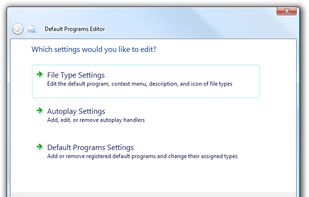
Default Programs Editor is a powerful but simple file association utility for Windows 7, Vista and XP. This free utility has three main functions: context menu editor, auto-play editor, and default programs association editor.

Platforms
- Windows
- .NET Framework


Discontinued
Last update: March 11, 2018 (version 2.7.2676.2142)

Features
Default Programs Editor News & Activities
Highlights All activities
Recent activities
- brokesimp69 liked Default Programs Editor
- mopetersondesign liked Default Programs Editor
Featured in Lists

Software that can be used to customize the Windows user interface.
List by AntumDeluge with 7 apps, updated

A list with 5 apps by Shojimeguro without a description.
List by Shoji VR with 5 apps, updated
What is Default Programs Editor?
Default Programs Editor information
Developed by
 Factor Mystic
 Licensing
Proprietary and Free product.Rating
Average rating of 3.6Alternatives
7 alternatives listedBadge
Get an embeddable badge for Default Programs EditorSupported Languages


Comments and Reviews
This is a great, I wish someone could remake this to work with Windows 8 & Later using SetUserFTA and add the ability to make file ext. app groups that show up in "default by app" in windows 10/11
this is good apps, developer should update it soon
Link is currently giving Bad Gateway error msg Major Geek download https://www.majorgeeks.com/mg/getmirror/default_programs_editor,1.html Defaults Program Editor will give you a much less bloated and easier to maneuver view of default file associations than Windows and more.
Allows changing of file type icons and associations among others
This is great utility that manages to handle a number of useful tricky things that have to do with file types (extensions) and the context menu associated with them, and icons, etc. It does quite a bit of really great things that not many applications do, or it might take a few to do what this one piece of software can do.
It hasn't been updated since October 29, 2010. It would be nice to know that the developer is still around and might make a few minor updates to accommodate various changes over the years. Maybe even a little bit of a GUI update?
Otherwise, fantastic! Very powerful and quite easy to use. Highly recommended.
This was an excellent, arguably the best programs of it's type. Please make it work with Windows 10
High quality, easy to use.