


LastPass
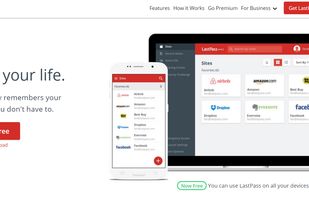
Password manager with unlimited storage, password generation, form filling, secure sharing, dark web monitoring, account recovery, and business tools like dashboards.

Cost / License
- Freemium (Subscription)
- Proprietary
Application typeApplication types
Platforms
- Mac
- Windows
- Linux
- Online
- Android
- iPhone
- Android Tablet
- BSD
- iPad
- Microsoft Edge
- Internet Explorer
- Vivaldi
- Google Chrome
- Maxthon Cloud Browser
- Opera
- Mozilla Firefox


Features

LastPass News & Activities
Recent News
- POX published news article about LastPass
 LastPass discloses another data breach via Klue supply chain attack, customer data exposed
Another day, another data breach for the widely-known password manager… LastPass has disclosed yet ...
- Maoholguin published news article about Bitwarden
 Researchers reveal flaws in several major Cloud Password Managers that could expose vaults
Researchers from ETH Zurich and Università della Svizzera italiana disclosed 27 vulnerabilities acr...
- POX published news article about LastPass
 LastPass introduces passkey support for safer, faster, and passwordless sign-ins
LastPass users can now create, store, and manage passkeys directly within their vaults, streamlinin...


Recent activities
- POX replied to a comment / review on LastPass
They've got this labelled wrong. It isn't free in the slightest. You have 30 days before they require you to subscribe to them. I don't like the fact that this is misleading and isn't disclaimed BEFORE I bother downloading the damn thing. I thought this website was supposed to be honest about an app's purchasing requirements?? Is that not the entire reason this website exists in the first place???
- alt-search liked LastPass
 POX added LastPass as alternative to Sesame Password Manager
- Markus-Lind added LastPass as alternative to NativePass
- bulldogs liked LastPass
 jsussanchez added LastPass as alternative to Easy Pass Login


Featured in Lists

This is going to be a list of the free tools/software that can be used mostly in any field. it's based on websites...

An up to date list of what I need in order to do my job.

A list with 144 apps by Nemets39 without a description.


What is LastPass?
LastPass information
Developed by
 LastPass US LP
 Licensing
Proprietary and Freemium product.Pricing
Subscription ranging between $3 and $11 per month + free version with limited functionality.Rating
Average rating of 2.4Alternatives
261 alternatives listedNews
14 news article related to LastPassBadge
Get an embeddable badge for LastPassSupported Languages
AlternativeTo Categories
Security & Privacy, Web BrowsersApple AppStore
- Updated
- 4.38 avg rating


Comments and Reviews
The best connection manager that I was able to use!
It works with all major browsers and there are 2 software for windows, the first is paying but with a trial offer (it is so much more integrated to the system), and the second which is free "lastpass - pocket" is less well integrated, but free.
Once integrated into whatever you use to navigate,and added with "synchronization systems" from browsers, you will not lose your passwords or notes!
It is known that Lastpass DOES NOT encrypt the URLs at which you have accounts. See here: https://systemoverlord.com/2015/09/16/what-the-lastpass-cli-tells-us-about-lastpass-design/
This means that which websites you have accounts with can be a) known to Lastpass, b) known to government agencies who subpoena them, c) known to anyone who breaches their servers to pull this data, d) used to profile users (you will have a fairly unique collection of URLs, probably), e) it might - in principle - be used to monitor when you call on Lastpass to let you into these sites.
Don't go with Lastpass. Go with Bitwarden, precisely because they are open source and because, unlike Lastpass, they encrypt EVERY field in your database.
An alternative is to go with something like KeepassXC (also open source) and connect to the browser via a plugin.
Very interesting, would you say Buttercup password manager is good too? It is open source but stores your data which is encrypted to Dropbox, Gdrive, Box
Buttercup is ok, and if you want to use services like Dropbox, Gdrive, etc. then that's your call. My opinion is that: 1.
Another option is to use Cryptomator to secure your files on Dropbox, etc. Cryptomator is one of my absolutely favourite apps for advancing online security: simple, free, open-source, necessary and cross-platform.
However, that doesn't get around the fact that if you go with, e.g. Buttercup + Dropbox (via Cryptomator or not), you still will have Dropbox, GDrive or whatever installed on your machine. I don't advise that, either (see list of alternatives above), because they have questionable practices. But that's a whole new rabbit hole to dive into and probably beyond the scope of this question/comment.
I see, well Buttercup says that they encrypt password file before storing it on Gdrive, Dropbox, etc. Also you do not need to have the Gdrive client installed on your device Buttercup to sync with it.
I'll open an issue on Github for Buttercup to have support for Sync.com it looks good. I am currently using Bitwarden, i have found Buttercup and enjoyed it only issue i have with buttercup is that it can't import Bitwarden CSV file and syncs with mainstream unproctected cloud services.
Thanks :)
Thanks for the forensic review ... good one Is your review still still apply in Aug-2023 ?
Maybe you can use libre or open source alternatives like Nextcloud to sync your keepassxc file. As long as your main password is secure enough on Keepassxc, why not.
They've got this labelled wrong. It isn't free in the slightest. You have 30 days before they require you to subscribe to them. I don't like the fact that this is misleading and isn't disclaimed BEFORE I bother downloading the damn thing. I thought this website was supposed to be honest about an app's purchasing requirements?? Is that not the entire reason this website exists in the first place???
It's listed as freemium, not free, because LastPass offers a free tier and 5 paid plans. I don't see what's wrong with the information…
It mostly works and does what it says, bit it’s chrome extension is clunky, and it’s difficult to know if you have access to something since things can easily get lost in the ui, or maybe you only have partial access or so,etching. Very confusing.
No, just don't use it
Viva KeepassXc or FOSS/Libre alternatives
password manager with the most data breaches which leadership tried to sweep under the rug