


MarkEdit
5 likes
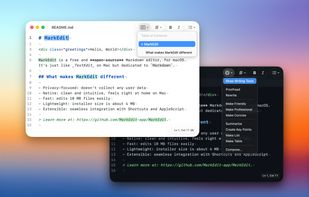
Free open-source Markdown editor for macOS with syntax highlighting, privacy-focused operation, lightweight 4 MB installer, native look and feel, AppleScript and Shortcuts support, QuickLook preview, theme customization, script extensibility, and rapid large file handling.

Cost / License
- Free
- Open Source (MIT)
Application type
Platforms
- Mac


Features
MarkEdit News & Activities
Highlights All activities
Recent activities
- dnylanderos liked MarkEdit
 mattneri added MarkEdit as alternative to TypeBreeze
 POX added MarkEdit as alternative to Clearly Markdown
 4worlds added MarkEdit as alternative to Inkwell Markdown Editor



MarkEdit information
Developed by
 Ying Zhong
 Licensing
Open Source (MIT) and Free product.Written in
Alternatives
21 alternatives listedBadge
Get an embeddable badge for MarkEditSupported Languages

AlternativeTo Category
Office & ProductivityGitHub repository
- 5,702 Stars
- 248 Forks
- 1 Open Issues
- Updated


Featured in Lists
Just a list in case I lose my other lists within my local storage :)
List by savyna with 35 apps, updated
Comments and Reviews
Fast and efficient editor. Shows all markdown syntax, while also styling text appropriately (bold, lists, links, etc).