
MiniMediaEdit icon
MiniMediaEdit icon

MiniMediaEdit

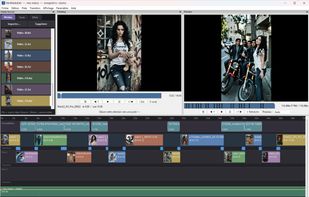
MiniMediaEdit is a small, no-nonsense video editor for quick edits: assemble clips, trim, mix an audio track, add transitions, export. It's not trying to replace DaVinci Resolve or Premiere — it does simple edits fast, without a multi-gigabyte install.
MiniMediaEdit

Cost / License

  • Free
  • Proprietary

Application type

Platforms

  • Windows  Requires FFmpeg to be installed and available in your PATH.
0likes
0comments
0articles

Features

Properties

  1.  Privacy focused
  2.  Lightweight

Features

  1.  Hardware Accelerated
  2.  Transitions Effects
  3.  Works Offline
  4.  Support for 4K
  5.  Ad-free
  6.  Live Preview
  7.  Portable

MiniMediaEdit News & Activities

Highlights All activities

Recent activities

MiniMediaEdit information

  • Developed by

    tritant
  • Licensing

    Proprietary and Free product.
  • Alternatives

    51 alternatives listed
  • Supported Languages

    • English
    • French

AlternativeTo Categories

System & HardwareVideo & Movies

Popular alternatives

View all
MiniMediaEdit was added to AlternativeTo by tritant on and this page was last updated .
No comments or reviews, maybe you want to be first?

What is MiniMediaEdit?

MiniMediaEdit is a small, no-nonsense video editor for quick edits: assemble clips, trim, mix an audio track, add transitions, export. It's not trying to replace DaVinci Resolve or Premiere — it does simple edits fast, without a multi-gigabyte install.

Features

Overlay track for animated text Video overlay effects with screen/lighten blending Preview video overlay effects before adding them to the timeline Built-in FX folder support for custom video effects Frame-by-frame preview controls Preview quality selector for smoother playback (low ram) Reverse playback for video clips Reverse playback support inside transitions Improved transition handling for snapped and overlapping clips More stable preview playback around transitions Export support for overlays, effects, reverse clips and complex transitions Update checker via GitHub Releases Improved logging and early crash reporting Media bin for videos, images and audio with thumbnails Trim player with in/out marks Multitrack video timeline + a dedicated audio track Video transitions: fades, slides, wipes, curtains, circles, pixelize, zoom and more Per-point audio volume automation Undo / redo Portable projects (a self-contained folder) Optional auto-save with crash recovery Export to H.264 / H.265 / VP9, with hardware acceleration (NVIDIA / Intel / AMD) when available Bilingual interface: English / French