




XYplorer
213 likes
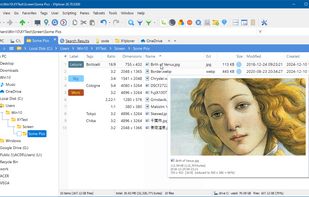
Tabbed browsing, dual pane file management, advanced search with filters, scripting and automation, customizable interface, bulk renaming, integrated file preview for various formats, portable operation without installation, user-defined commands, and multi-language support.

Cost / License
- Pay once
- Proprietary
Application typeApplication types
 EU
EUPlatforms
- Windows


Features
XYplorer News & Activities
Highlights All activities
Recent News
No news, maybe you know any news worth sharing?
Share a News TipRecent activities
 Maik-Hofmann added XYplorer as alternative to Peach Commander
- TBayAreaPat replied to a comment / review on XYplorer
- Usnyn liked XYplorer
- brokesimp69 liked XYplorer
 kodar_ninja added XYplorer as alternative to TheFile.Ninja
- lian00 replied to a comment / review on XYplorer




Featured in Lists
All types of Management Software.
List by David with 27 apps, updated

🏆 = seriously impressed/impresses me
List by Hush1503 with 86 apps, updated

Mostly free Filemanager, File Management, File Utility, Archiver, CRC Hashing software.
List by Favored Apps & Software with 12 apps, updated
What is XYplorer?
XYplorer information
Developed by
 Cologne Code Company
 Licensing
Proprietary and Commercial product.Pricing
One time purchase (perpetual license) ranging between $35 and $70.Rating
Average rating of 4.1Alternatives
103 alternatives listedBadge
Get an embeddable badge for XYplorerSupported Languages


Comments and Reviews
If I had to choose between The Second Coming of Christ and Xyplorer, I would choose Xyplorer. It's that good!
The author (Donald Lessau) is an eccentric and genius programmer who has gone to extreme lengths to optimize the efficiency of the code in this program, and he has released so many updates over the past 10 years I am astonished and flabbergasted at how he does it.
The amount of functionality in Xyplorer is so deep and so comprehensive, it's practically a file manager operating system. However, all features are configurable and you can disable anything you don't want, so it doesn't get too overwhelming. The important thing is that the features are in there for when you need them.
The usability of this program is off the charts! Donald has accommodated just about everybody's preferences, to the point where you get 6 different choices for the coloring scheme used to style the alternating white-gray Details mode ListView! There are practically 3 ways to do everything - so whichever way you reach for first, just works.
I can't say enough about this program other than to BUY IT IMMEDIATELY and you'll never look back. Seriously, Donald is a power user's power user, so to speak (ala "a Man's man"), so you won't find any frustrating or stupid design decisions in this software like you do with most typical software.
Ultimately not for me. •I love that you can hide elements like the toolbar, directory, panes. Lots of color/appearance settings. It's also remarkably space-efficient, other explorer alternatives are several hundred MBs. •To me "Trees" (default left side folder directory) is effectively redundant with "Breadcrumbs." Also rather annoying it automatically expands to whatever folder you have selected. You can use it as a bookmarks bar by right-clicking empty space and choosing a favorited folder but it's not a great use of space. •Disappointed there's no file preview on cursor hover like Qttabbar, you're reliant on a preview window and manually selecting files like a dark ages tradition. I suspect it's slower than default explorer and generating thumbnails is also surprisingly slow. •Opening the configuration options window bizarrely takes 6 or 7 seconds to open, something that really piles up when there's no "apply changes" button to preview.
Overall I think it's a better looking alternative than the numerous -Commanders out there but it's not quite enough to dethrone more user-friendly explorer GUIs. I don't doubt the other reviews, just not worth exploring for me.
Just to say that there is an hovering preview for images, text… since a long time (you must have missed it) and you can change the tree mode with something different (Rapid Access, groups of favorites…).
XYplorer could be a pretty good file manager, but it lacks a very basic (yet crucial) feature that even Windows File Explorer has: "File Grouping". It's baffling that any Windows file manager, especially a paid, lacks that feature. This has been brought up several times, and it seems that the developer is either unwilling or incapable of adding this feature. Some people suggest using "double sorting", but they don't understand that "grouping" is not the same as "sorting". Not only are they visually different, but grouping by file type is not the same as sorting by file extension.
One star because it lacks your favorite feature ? One star is for "it’s a bad program".
Last free version 17.40.100 https://www.xyplorer.com/free.php
Note that Winmerge context function doesn't integrate with free XYPlorer, though it does with Double Commander.
One of the best third-party file management apps I've used, and I've tried many. The program is well polished and easily customizable. Well worth the registration cost.
This is one of the very few proprietary softwares that I absolutely love and can warmly recommend. I was a xyplorer user back in the early days of the software and was already enthusiastic back then. In the meantime, I have become a linux user and have turned my back on windows. But lately I've been using windows from time to time to test software that I've created for customers - and I was shocked to see where the file manager of windows 11 has become.. Where the file manager under Win-7 or say Win-10 was still “Lego”, under Windows 11 it has become “Duplo” for babies.
To cut a long story short: In this visual comparison, Xyplorer is something like a skyscraper. It is not only a MUST HAVE for power users, but also has no alternative in its field.
1,114 / 5,000 I have used it as a portable since its first releases (in the time of XP...) with great satisfaction, even though I am aware of not taking advantage of its deepest possibilities. As a basic user I only benefit from the complete color customization (you can even designate colors according to file extension... imagine), tools menu and the agility in file management (the option to configure it as the default file explorer, the double window, the
ascenterwith double clicking on empty space, navigation through the folder tree or the possibility of launching a cmd prompt from the built-in customizable right click and the countless, everlasting tabs) The elaborate customization of the configuration file can be saved as a copy from the menu options, and has the ability to save a complete copy of Data, making silent reinstallation comically simple. Although I tried many of the alternative candidates, I never found a replacement for its functionalities and flexible environment adaptability, it is simply one of a kind.