Apps with 'Subtitles' feature Page 9 of 12

All apps in Apps with 'Subtitles' feature category. Use the filters below to narrow down your search. 
Copy a direct link to this comment to your clipboard
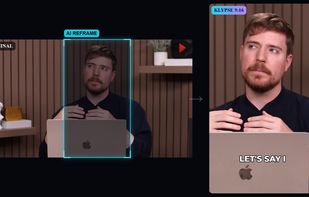
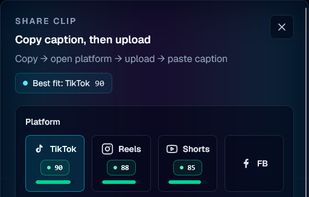
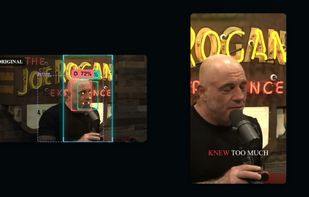
  1. Klypse is an AI-powered video clipping platform that automatically transforms long-form videos into engaging short-form content with smart highlight detection, captions, face tracking, AI reframing, and viral-ready thumbnails for TikTok, Instagram Reels, and YouTube Shorts.

    Cost / License

    • Freemium
    • Proprietary

    Application type

    Platforms

    • Online
    Klypse.app screenshot 1
    Klypse.app screenshot 1
    Klypse.app screenshot 2
    +14
    Klypse.app screenshot 3
    7 alternatives
  2. Frieze icon
     1 like

    Frieze is a professional subtitling suite for subtitle operators and production teams working in theatre and cinema environments. It handles — import, authoring, styling, and routing — with deep customization over every layer.

    Cost / License

    • Paid
    • Proprietary

    Platforms

    • Windows
    • Mac
    Frieze screenshot 1
    8 alternatives
  3. Inwista icon
     Like

    Inwista turns audio and video into accurate, speaker-labeled transcripts and broadcast-grade subtitles in 70+ languages, and gives you a full video studio to edit, translate and generate content in the same project.

    Cost / License

    • Freemium
    • Proprietary

    Application type

    Platforms

    • Software as a Service (SaaS)
    • NO flagNorway
    Inwista screenshot 1
    Inwista screenshot 1
    Inwista screenshot 2
    +4
    Inwista screenshot 3
    23 alternatives
  4. SEO GPT icon
     Like

    SEO GPT: The free, ultimate AI-based SEO tool that uses live data analysis to turn your URL and keyword into unique titles, meta descriptions, topics, ideas, FAQs and other short content that are natural and can pass AI detection.

    Cost / License

    • Free
    • Proprietary

    Platforms

    • Online
    • Chrome OS
    • Firefox
    • US flagUnited States
    SEO GPT screenshot 1
    SEO GPT screenshot 1
    SEO GPT screenshot 2
  5. Bulk Transcript lets you transcribe short-form videos in bulk. Paste multiple Instagram Reel, YouTube Short, or TikTok URLs, hit one button, and get every transcript back in seconds. Export as plain text or SRT subtitles.

    Cost / License

    • Paid
    • Proprietary

    Platforms

    • Online
    Bulk Transcript screenshot 1
    Bulk Transcript screenshot 1
    Bulk Transcript screenshot 2
    +2
    Bulk Transcript screenshot 3
  6. StudioEditor is a free, browser-based audio workspace for recording multiple inputs and online participants, editing on a multitrack timeline, saving projects, creating artwork and exporting at platform-ready loudness.

    Cost / License

    • Freemium
    • Proprietary

    Application type

    Platforms

    • Online
    • Self-Hosted
    • Google Chrome
    • Mozilla Firefox
    • Safari
    • Microsoft Edge
    • FI flagFinland
    • European Union flagEU
    Studioeditor.io audio enhancement presets
    studioeditor.io text-based editing
    studioeditor.io pro mode audio track boxes
    +2
    studioeditor.io free podcast artwork tool
    3 alternatives
  7. TubeScribeAI is a free YouTube transcript and productivity toolkit, available as a website and a Chrome extension, built for anyone who needs to pull information out of a YouTube video faster than watching it start to finish.

    Cost / License

    • Free
    • Proprietary

    Platforms

    • Online
    • Google Chrome
    • RS flagSerbia
    Website - YouTube Chapter Generator
    Chrome Extension - Translate
    Chrome Extension - Transcript
    +2
    Website - YouTube AI Summary
    13 alternatives
  8. BriefMeet icon
     Like

    BriefMeet converts meetings, interviews, lectures, podcasts, and sales calls into searchable transcripts and structured notes. Upload a recording in any of 13 formats (MP3, MP4, WAV, M4A, MOV, WEBM, MKV, AAC, FLAC, OGG, AVI, WMV, FLV) up to 5 GB, and get a transcript with...

    Cost / License

    • Freemium
    • Proprietary

    Application type

    Platforms

    • Online
    • PK flagPakistan
    BriefMeet screenshot 1
    BriefMeet screenshot 1
    BriefMeet screenshot 2
    +1
    BriefMeet screenshot 3
    5 alternatives
  9. FinallySubbed leverages AI to auto generate subtitles and translations for your video and audio. It supports 100 languages and can process files within minutes, saving you endless hours of tedious transcription.

    Cost / License

    • Free
    • Proprietary

    Platforms

    • Online
    Upload files to process and track status
    See generated subtitles with translations and download in various formats
  10. Live Subtitles is an AI live caption and dual subtitles app that transcribes any audio and translates it into 30+ languages in real time — live captions and bilingual subtitles for Zoom, Teams, YouTube, Netflix, Twitch, Discord and any app on Windows, macOS and iPhone.

    Cost / License

    • Freemium
    • Proprietary

    Application type

    Platforms

    • Mac
    • Windows
    • iPhone
    • iPad
    • KZ flagKazakhstan
    Real-time game subtitles with instant translation — never miss dialogue or cutscenes, no need to pause the game.
    Dual subtitles for YouTube, TED talks, and online lectures: the original speech on top, the live translation below.
    Live captions and real-time translation for Zoom, Microsoft Teams, Google Meet, and Discord — accurate across accents and languages.
    +1
    Bilingual subtitles for Netflix, Prime Video, Disney+, and any video player — instant translation into 30+ languages.
  11. Wavcut icon
     Like

    Wavcut is an on-device video editor built to 10x your creation speed. Add a video / voice recording and it auto-edits: layers saved B-roll, generates styled auto-captions, auto cut silences. Save your video style once and reuse on every video as a Preset.

    Cost / License

    • Freemium
    • Proprietary

    Application type

    Platforms

    • iPhone
    • IN flagIndia
    Full manual control over captions, text, b-roll, and voiceover on a real timeline
    Auto-editing cuts silence, adds captions, and places b-roll automatically
    Organize your b-roll into collections and reuse or let Wavcut place them across every video
    21 alternatives
  12.  Like

    Chrome extension and web app that lets you create flashcards from words in YouTube subtitles or web pages with built-in offline dictionary, sentence context, IPA, difficulty level, and images.

    Cost / License

    • Paid
    • Proprietary

    Application type

    Platforms

    • Online
    • Google Chrome
    • KR flagSouth Korea
    Piccard screenshot 1
    Piccard screenshot 1
    Piccard screenshot 2
    11 alternatives
  13. JustPlay icon
     1 like

    JustPlay is a simple media player that will just play any video or audio file you have. It supports MP4, AVI, MOV, SWF, DAT, MKV, MP3, FLAC, M4V, FLV, Blu-ray, etc. You won't need additional codecs or plugins - this tiny player actually comes packed with all necessary stuff...

    Cost / License

    • Paid
    • Proprietary

    Application type

    Platforms

    • Mac
    • US flagUnited States
    Universal video player
    Subtitles support
    Supple audio settings
    +1
    Video settings
    8 alternatives
  14. Checksub icon
     1 like

    Checksub is a company specialised in captioning services since 2017. We developed an automatic subtitle editor to easily create subtitles for any videos. Associate to professional captioners we provide the most efficient subtitling service in Europe.

    Cost / License

    • Freemium
    • Proprietary

    Platforms

    • Online
    Checksub screenshot 1
    23 alternatives
  15. AST leverages smart automation and professional transcribers to power its CaptionSync closed captioning services. CaptionSync is an accurate, affordable web-based solution for closed captions, transcripts, translation and video search data.

    Cost / License

    • Paid
    • Proprietary

    Platforms

    • Online
    11 alternatives
  16. Subtitle editor with AI functions like automatic subtitle generation. It can recognize speech in different languages, automatically generate subtitles, automatically synchronize misaligned subtitles to audio, easily translate subtitles to different languages.

    Cost / License

    • Freemium
    • Proprietary

    Application type

    Platforms

    • Windows
    PixVis Subtitler screenshot
    31 alternatives
  17. PGSRip icon
     Like

    PGSRip is a command line tool that allows you to extract and convert PGS subtitles into SRT format. This tool requires MKVToolNix and tesseract-ocr and tessdata.

    Cost / License

    • Free
    • Open Source (MIT)

    Platforms

    • Linux
    • CH flagSwitzerland
    extracting english subtitles from a movie
  18. ViSearch icon
     Like

    ViSearch is an AI-powered video intelligence platform. Upload any video or audio file or add a YouTube link, and ViSearch turns it into an accurate transcript with speaker labels, subtitles in SRT and VTT formats, interactive timestamped chapters, smart summaries, and...

    Cost / License

    • Paid
    • Proprietary

    Application type

    Platforms

    • Online
    • Software as a Service (SaaS)
    ViSearch screenshot 1
    ViSearch screenshot 1
    ViSearch screenshot 2
    +2
    ViSearch screenshot 3
    6 alternatives
  19. igscript icon
     Like

    igscript takes a link to a public Instagram video or Reel, a TikTok video, or a YouTube video and returns a transcript of what is said in it. The transcript can be copied as plain text or downloaded as a TXT file, or as SRT subtitles with timestamps.

    Cost / License

    • Free
    • Open Source (MIT)

    Platforms

    • Online
    • CN flagChina
    igscript.com transcribing a real Instagram Reel  — the pasted link returns the spoken words as text, ready to copy or download as TXT/SRT.
    The igscript.com homepage on a phone — paste an Instagram link, hit Transcribe, and get the transcript; all footer pages (About, Privacy, Contact, Sitemap) are live.
    4 alternatives
  20. DCP-o-matic is a free, open-source program to create Digital Cinema Packages (DCPs) from videos, images, sound and subtitle files. You can use it to make content for playback on DCI-compliant cinema projectors.

    Cost / License

    • Free
    • Open Source

    Platforms

    • Mac
    • Windows
    • Linux
    2 alternatives