


Nextcloud Tasks
9 likes
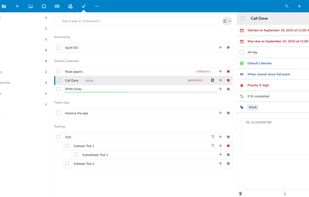
Once enabled, a new Tasks menu will appear in your Nextcloud apps menu. From there you can add and delete tasks, edit their title, description, start and due dates, reminder times, mark them as important, and add comments on them. Tasks can be shared between users.

Cost / License
- Free
- Open Source (AGPL-3.0)
Application typeApplication types
 EU
EUPlatforms
- Online
- Self-Hosted
- Nextcloud

Features
Nextcloud Tasks News & Activities
Highlights All activities
Recent activities
 triggerflo added Nextcloud Tasks as alternative to TriggerFlo
 margolisdavid added Nextcloud Tasks as alternative to Nyblit
 gingermanymph added Nextcloud Tasks as alternative to CheckRun Extension
 basmatthee added Nextcloud Tasks as alternative to Hash#Todo
 caio-sizemotion added Nextcloud Tasks as alternative to Sizemotion
- Happymomof2 liked Nextcloud Tasks
 POX added Nextcloud Tasks as alternative to Mindwtr
 POX added Nextcloud Tasks as alternative to Fira
 AlexanderT added Nextcloud Tasks as alternative to Notetask
 danycryptodev added Nextcloud Tasks as alternative to Task GUN


Nextcloud Tasks information
Developed by
 Raimund Schlüßler
 Licensing
Open Source (AGPL-3.0) and Free product.Written in
Alternatives
275 alternatives listedBadge
Get an embeddable badge for Nextcloud TasksSupported Languages

AlternativeTo Category
Office & ProductivityGitHub repository
- 706 Stars
- 117 Forks
- 167 Open Issues
- Updated


No comments or reviews, maybe you want to be first?